Learn everything you need to know about setting up a professional Roblox announcement script for your experience this year 2024. This guide covers the essential tools used in Roblox Studio and explains why communication is vital for maintaining a healthy player base. From simple UI popups to advanced global server broadcasts we look at how Luau scripting facilitates better engagement. You will discover methods for creating real time notifications and handling data across different servers. Whether you are a beginner or an experienced developer this informational resource provides clear steps to improve your game design. We explore the latest trends in community management and how scripts can automate important messages for players. Creating a system for announcements is a fundamental skill for any serious Roblox developer looking to scale their game effectively.
How do I script a global announcement in Roblox?
To script a global announcement, use the MessagingService to publish a message from one server to all others. Each server should subscribe to a specific topic and use a RemoteEvent to trigger the UI on every client. This ensures that every player sees the update simultaneously, regardless of which server instance they are currently playing in.
How do you use MessagingService for game-wide alerts?
You use MessagingService:SubscribeAsync() to listen for messages on a specific topic and MessagingService:PublishAsync() to send them. When a message is received, the script should fire a RemoteEvent to all players. This is ideal for sharing developer notes, event starts, or emergency maintenance alerts across your entire game network safely and efficiently.
What is the best way to display announcements to players?
The best way is to create a custom ScreenGui with a TextLabel that can be toggled via a local script. Using TweenService to fade the message in and out adds a professional touch. Ensure the UI is responsive so it looks great on both mobile devices and PC monitors, and include a close button for non-essential messages.
How can I restrict announcements to only game admins?
In your server script, always check the Player.UserId or use Player:GetRankInGroup() before allowing a command to fire the announcement. This prevents exploiters from using your RemoteEvents to send unauthorized messages. Secure server-side validation is the only way to ensure your communication tools remain under your exclusive control at all times.
Can I automate announcements for specific game events?
Yes, you can trigger announcements by calling your messaging function within other scripts, such as when a boss spawns or a round ends. Simply pass the desired text to your announcement handler whenever the specific logic conditions are met. This creates a dynamic environment that keeps players engaged with the evolving state of your game world automatically.
Blog Post Most Asked Questions about Announcement Script Roblox
Tips for Successful Game Communication
When sending announcements, keep them brief and high-impact to ensure players actually read them. Avoid spamming the screen too frequently, as this can lead to player frustration and lower engagement. Use clear, contrasting colors for your text to ensure readability against any game background.
How to Fix Common Scripting Bugs
If your announcement isn't showing, check the Output window for errors related to MessagingService rate limits. Ensure your RemoteEvent is correctly placed in ReplicatedStorage. A common mistake is forgetting to set the TextLabel.Visible property to true in the local script during the event trigger.
Tricks for Advanced UI Design
Incorporate UIStroke and UICorner elements to give your announcement boxes a modern, sleek appearance. You can also use SoundService to play a notification chime when a message appears, grabbing the player's attention instantly. Dynamic text scaling ensures that long messages remain legible on smaller smartphone screens.
Endgame Community Management
As your game grows, consider adding a history log where players can review past announcements. This is particularly helpful for complex RPGs or simulators with frequent balance changes. Providing a clear record of communication helps build a dedicated and well-informed community that trusts your development process.
Summary of Announcement Systems
Building a robust announcement system in Roblox is a rewarding project that combines UI design, server-client networking, and global messaging. By using MessagingService and RemoteEvents, you can create a professional tool that keeps your players informed and engaged. It is a vital step in evolving from a hobbyist to a serious game developer on the platform. 😊
Basically, a Roblox announcement script is your direct line to your players. It allows you to shout out big news, warn about server restarts, or just say hey to everyone at once. Think of it as the town crier for your digital world, making sure nobody feels left in the dark when things are happening behind the scenes.
Setting this up might feel a bit technical at first, but once you get the hang of how the server talks to the client, it becomes second nature. It is all about making the experience feel professional and alive. Your players will definitely appreciate the heads-up when you are about to drop an awesome new update or fix a pesky bug.
The coolest part is that you can make it look however you want, from a subtle top-bar message to a big, flashy popup. It is one of those small features that makes a massive difference in how people perceive your game. One interesting takeaway is that games with clear communication systems often see much higher player retention during update cycles. Still have questions? Check out our popular guides on DataStores and Advanced UI Tweaning!"
How do I make a global announcement in Roblox for every single server running my game right now? Many aspiring developers ask this question when they want to professionalize their experience and keep players in the loop. I have spent years watching games thrive or fail based on how well they communicate with their community. A great announcement script is more than just text on a screen because it builds trust between you and players. You want to make sure your messages are clear and timely without being annoying to those who are playing. Creating a system that works across all servers requires a deep understanding of the Roblox MessagingService and UI logic. We are going to explore the best ways to build this system from the ground up in this guide.
Understanding the Importance of Game Communication
Communication is the backbone of any successful online multiplayer game that hopes to retain its player base over time. You need a way to tell your players about upcoming maintenance or special holiday events without shutting down servers. A well designed script allows you to reach every player instantly through a beautiful and easy to read interface. This prevents confusion when things change and helps create a sense of a living and breathing game world for users. Many players appreciate knowing exactly what is happening in the background while they are exploring your digital creations. You should aim for a system that is both reliable and visually consistent with your game brand and style. Building this tool will make you a much more versatile developer in the long run for any project.
Setting Up the Essential Foundation in Roblox Studio
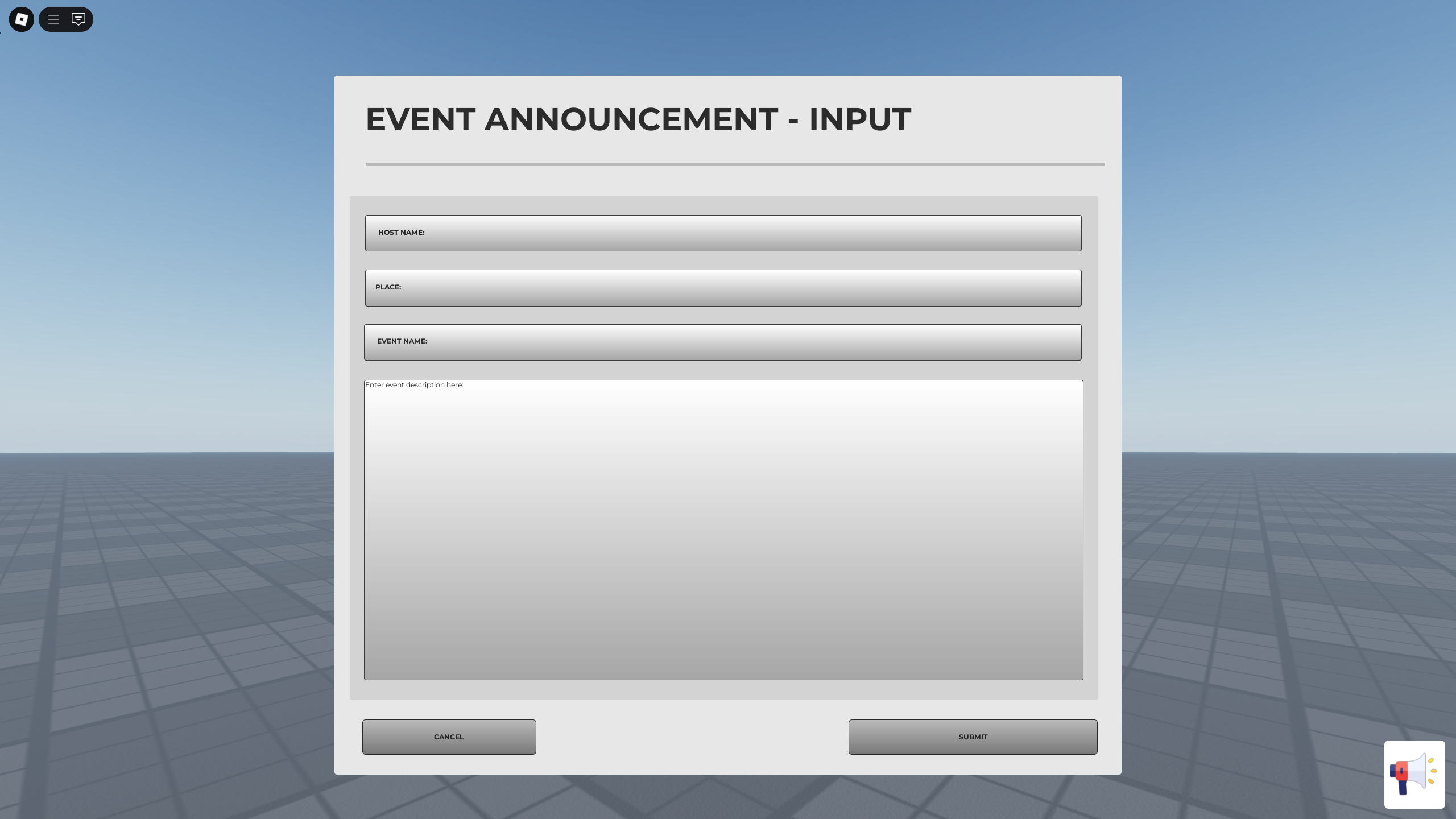
The first step involves creating a robust user interface that can display your important messages to every single player. You should start by inserting a ScreenGui into the StarterGui folder to serve as the main container for text. Inside this container you will need a Frame and a TextLabel to show the actual announcement text to players. Make sure to set the Visibility property to false by default so it does not block the main screen. You will use a local script to handle the animations and the appearance of the message when it triggers. Using professional fonts and colors will help your announcements stand out from the rest of the game environment assets. Remember that the layout should be mobile friendly so that phone users can read your messages just as easily. This foundation is critical for everything else that follows in the coding process for your new announcement system.
- Create a ScreenGui in StarterGui for the display.
- Add a TextLabel to represent the message content clearly.
- Set the default visibility to false to hide it initially.
- Use Scale instead of Offset for responsive UI design.
- Include a close button if the message is not critical.
Scripting the Server to Client Logic
Your server needs a way to tell every individual client when it is time to show a new announcement. This is where RemoteEvents come into play to facilitate the communication between the server and the local player scripts. You should place a RemoteEvent in ReplicatedStorage where it can be accessed by both the server and the client. The server will fire this event whenever an admin enters a command or a scheduled event begins in game. On the client side you will have a listener that waits for the event to fire and then displays. This separation of concerns ensures that your game remains secure while still being highly responsive to your administrative commands. You can even pass parameters like the message content and the duration through the event for extra creative control. Mastering this specific workflow is a key milestone for any developer learning the Luau programming language in Roblox.
Advanced Global Messaging Across All Servers
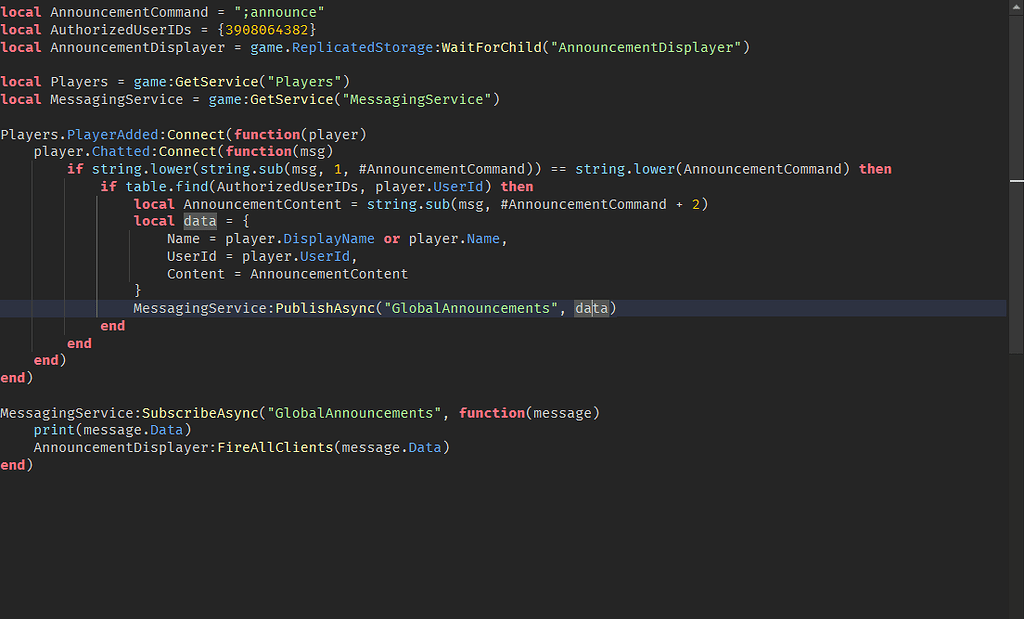
If you want your announcement to appear in every active server at once you must use the MessagingService API. This powerful tool allows different server instances to talk to each other across the entire Roblox cloud infrastructure system. You define a topic name like GlobalAnnouncements and have every server subscribe to that specific topic upon starting up. When you publish a message to that topic every server receives the data and fires the local RemoteEvent automatically. This creates a seamless experience where players across the globe see your update at the exact same moment in time. Be careful to follow the rate limits provided by Roblox so you do not overwhelm the system with messages. Real time global communication is what separates the amateur games from the top tier experiences on the popular page. You will find that this feature is indispensable for large scale live events and emergency bug fixes in production.
Beginner / Core Concepts
1. **Q:** What exactly is an announcement script in the context of a Roblox game experience? **A:** I get why this sounds like a complex term for something that seems very simple on the surface levels. An announcement script is a set of Luau instructions that tells the game to show a message to players. It usually consists of a server side script that handles the logic and a client side script for the UI. You use it to inform players about updates or server restarts without them needing to check social media sites. Reality check is that you can start with a very basic version and add more features as you learn. Try making a script that just says Hello World when a player joins the game today. You have got this!
2. **Q:** Do I need to be a professional programmer to make a basic announcement system for my game? **A:** This one used to trip me up too when I first started exploring the world of Roblox Studio development. You definitely do not need a computer science degree to create a functional and helpful announcement system for your players. Most basic systems only require a few lines of code to display a simple text label on the screen. There are many free templates available in the Toolbox that you can study to understand the core logic used. The most important thing is to understand how the UI components interact with the scripts you write in Luau. Start small and focus on getting one message to appear before trying to build a global broadcasting system. You have got this!
3. **Q:** Where should I put my scripts so that they work correctly for every player in the server? **A:** I totally understand the confusion since there are so many different folders in the Roblox Studio explorer window today. Your main logic script should go into the ServerScriptService folder to keep it safe from any potential client tampering. The visual part of the system belongs in the StarterGui folder so that every player receives their own copy. You will also need a RemoteEvent placed inside the ReplicatedStorage folder so the server and client can communicate easily. This structure is the standard industry practice for building interactive systems that need to be both secure and functional. Keeping your workspace organized from the start will save you many hours of debugging later in your career. You have got this!
4. **Q:** Can I change the color and font of my announcements to match my specific game theme? **A:** This is a great question because visual consistency is a huge part of making your game feel professional. You can customize every aspect of the TextLabel component including the font type and the background transparency levels. I recommend using the Properties window in Roblox Studio to experiment with different styles until you find a look. You can also use code to change these properties dynamically if you want different types of alerts for players. For example you could use red text for urgent warnings and green text for fun community celebration events. Making your UI look good is just as important as making sure the code behind it works perfectly. You have got this!
Intermediate / Practical & Production
5. **Q:** How do I make sure only the game owner or admins can send out a new announcement? **A:** I get why security is a top priority because you do not want random players taking over the screen. You should add a check in your server script to verify the UserId of the person sending the command. Only if the UserId matches your own or a list of trusted admins should the script proceed to fire. This prevents malicious users from exploiting your RemoteEvents to spam the entire server with unwanted or inappropriate messages. You can also create a special admin panel UI that only becomes visible to authorized users when they join. This adds a layer of professionalism and control to your game management tools that players will never even see. You have got this!
6. **Q:** What is the best way to animate the announcement so it slides smoothly onto the player screen? **A:** This used to confuse me until I discovered the TweenService which is a powerful tool for creating smooth transitions. Instead of just making the UI appear instantly you can animate its position or transparency over a short period. This creates a much more polished feel that mimics the high production values found in the most popular games. You can find many tutorials on how to use the TweenInfo object to customize the easing style and direction. Adding a slight bounce or a fade in effect can make the announcement feel more integrated into the experience. Players tend to notice these small details and it makes your game stand out from the basic competition. You have got this!
7. **Q:** How can I send a message that stays on the screen for a specific amount of time? **A:** I understand why timing is important because you want players to have enough time to read the full message. You can use a simple task.wait function in your local script after the UI has been made visible to everyone. After the wait time has passed you simply set the visibility back to false or play a closing animation. It is usually best to give players at least five to ten seconds depending on the length of text. You can even include a close button so that fast readers can get back to the action immediately. This gives the player more control over their own screen space which is always a good design choice. You have got this!
8. **Q:** Is there a way to store a history of announcements so players can read them later on? **A:** This is a fantastic idea for keeping players informed about things they might have missed while they were away. You can use a ScrollingFrame to hold a list of previous messages that players can open from a menu. Every time a new announcement is sent you can add a new TextLabel to this list for future reference. This is especially useful for detailed patch notes or long term event schedules that players need to check frequently. It keeps your main screen clear while still providing all the necessary information to anyone who is truly curious. You can even save these messages to a DataStore if you want them to persist across different game sessions. You have got this!
9. **Q:** How do I handle very long messages that might not fit in a single standard text box? **A:** I have struggled with this too when trying to explain complex new features to my loyal player base. The best approach is to use the TextWrapped property and a UIListLayout to ensure the text scales correctly and fits. You should also consider using a larger frame that can expand based on the amount of content you are providing. Alternatively you can break the announcement into multiple pages that players can click through at their own individual pace. This prevents the screen from becoming too cluttered and makes the information much easier for the players to digest. Clear communication is always better than a wall of text that nobody wants to spend time reading carefully. You have got this!
10. **Q:** Can I trigger an announcement automatically when a certain in game event happens like a boss fight? **A:** This is a brilliant way to increase the tension and excitement within your game world during key gameplay moments. You just need to call your announcement function from the script that handles the specific event logic in your game. For example when the boss health reaches zero you can trigger a global message celebrating the victory for everyone. This creates a shared experience for all players in the server and makes the world feel much more reactive. You can use different sound effects alongside the text to make the announcement even more impactful for the players. Automation is your best friend when it comes to creating a dynamic and engaging environment for your community. You have got this!
Advanced / Research & Frontier
11. **Q:** How does MessagingService work under the hood to connect thousands of different servers across the world? **A:** I get why this feels like magic because it is one of the most advanced features Roblox provides. It uses a pub sub model where servers subscribe to specific topics and listen for incoming data packets from others. When you publish a message the Roblox backend routes that data to every server that is currently listening. It is designed to be extremely fast but it does have some limitations on how much data you can send. You should only send essential strings or tables to avoid hitting the frequency limits set by the platform engineers. Understanding the backend infrastructure helps you write more efficient code that scales as your game grows in popularity. You have got this!
12. **Q:** Can I use an external website or Discord to send announcements directly into my Roblox game? **A:** This is a very common request for developers who want to manage their games without having to log in. You can use HttpService to create a bridge between an external API and your Roblox server scripts in the game. This allows you to post a message in a Discord channel and have it appear in game instantly. It requires setting up a web server or using a third party service to handle the outgoing requests safely. This level of integration is powerful but requires a good understanding of web protocols and security best practices. It is a game changer for community managers who need to push updates while they are away from home. You have got this!
13. **Q:** What are the performance implications of having a complex announcement system running in a full server? **A:** I understand the concern because you never want your admin tools to cause lag for the players in game. Fortunately a well written announcement script has almost zero impact on the overall performance of your game server or client. MessagingService and RemoteEvents are optimized for high speed and low memory usage when used correctly by the developer. You should avoid running expensive loops or complex calculations inside your UI scripts to keep the frame rate high. As long as you are not spamming hundreds of messages per second your system will be perfectly smooth for everyone. Always test your scripts in a live environment to ensure they behave exactly as you expect under load. You have got this!
14. **Q:** How do I localize my announcements so that players from different countries can read them in their language? **A:** This is a vital step if you want your game to have a truly global appeal and reach. Roblox provides a LocalizationService that allows you to translate strings based on the locale of the individual player computer. You can set up a translation table that automatically converts your English announcements into Spanish or Chinese for those users. This makes your game much more accessible and welcoming to people from all over the world who play Roblox. It does require some extra work to set up the keys and values for every message you want to send. However the increase in player satisfaction and retention is well worth the effort for any serious game project. You have got this!
15. **Q:** What is the best way to debug an announcement script that is not showing up for players? **A:** I have been there many times and it usually comes down to a small error in the script logic. The first thing you should do is check the Output window for any red error messages that indicate a crash. Use print statements at different stages of the code to see if the script is actually reaching the event. Make sure your RemoteEvent names match exactly on both the server and the client side to avoid simple typos. Sometimes the UI visibility is set correctly but the frame is positioned off the screen where nobody can see. Checking these basic things will solve almost every problem you encounter while building your system for the game. You have got this!
Quick Human-Friendly Cheat-Sheet for This Topic
- Always use RemoteEvents to connect your server commands to the player user interface.
- MessagingService is your best friend for sending global messages across every active server instance.
- Keep your UI design simple and clean so it does not distract from the gameplay.
- Test your scripts in a local server with multiple players to ensure everything replicates correctly.
- Use TweenService for smooth animations that make your game feel more professional and polished.
- Always include security checks to prevent unauthorized players from sending their own announcements.
- Have fun with your community and use announcements to build excitement for new game updates.
Luau scripting fundamentals for UI. Implementation of MessagingService for global reach. Using RemoteEvents for server to client communication. Best practices for community engagement and notifications. Scalable systems for game updates and server alerts.
35



How To Message On Roblox 2026 A Quick Guide SL1500 . Make GLOBAL In Roblox Studio YouTube . Weekly Recap January 26 30 2026 Developer Forum . Anyone Know The Old Thing Scripting Support Developer . Roblox GUI In Game Discord Broadcast O


How To Make An System In Roblox Studio Free Model 2025 . How To Create GLOBAL Roblox Studio YouTube . Global Announce V2 Showcase Roblox Studio YouTube . How To Make A System In Roblox Studio 2022 YouTube . How To Add Global In Roblox Studio Roblox Studio



Contoh Roblox Scripts 2026 Panduan Lengkap Untuk Pemula Jurnal Ngawi 3789630207 . Studio Script Sync Now In Beta Page 5 Developer 2 1024x576 . How To Make A Global System Roblox Roblox Scripting . How To Make GLOBAL In ROBLOX YouTube . System Roblox Studio SALE YouTube


Roblox Server Global System YouTube . Introducing For Roblox Groups Page 13 2 1023x603 . System V1 0 Server Global Clearly Development 1734581404 205467346 Screenshot 2024 12 18 194326 . Introducing For Roblox Groups Developer . Script Application Roblox Coding Guide To Master Roblox Learn Roblox Scripting Web Copy


NEW How To Use Roblox Scripts TUTORIAL YouTube . Prepare For 2026 With Roblox Trends TikTok Img. Definitive Guide To Roblox 2026 TM 07169 AU 19 60 Football Heaven TM 07169 Definitive Guide To Roblox 2026 . Roblox 2026 New Logo REVEAL First Look At The Future Shorts YouTube Hq2 . Global Command In Cmdr Panel Scripting Support 2 1024x619



How To Publish A Roblox Game In 2026 YouTube . Roblox 2026 Logo REVEALED New Color New Look YouTube Maxres2 . ArtStation Roblox Scripting Public System Izxnp Izxnp After2 . WOW The 2026 Roblox Logo Shocks All Players YouTube Maxres2 . Introducing For Roblox Groups Developer




How To Make An System In Roblox YouTube Hqdefault . What Is Roblox Terumi Script And Its Role In Gaming Como Usar Scripts En Roblox Studio . Scripting An Gui Scripting Support Developer Forum . Roblox Tutorial How To Make An Easy Global System YouTube . 100 Unofficial Roblox Annual 2026 4687858526 5