Understanding how much bandwidth gaming uses per hour is crucial for a smooth, lag-free online experience, especially for busy US gamers balancing work, family, and precious free time. Modern gaming, from competitive esports to relaxing social titles, demands a stable internet connection. This comprehensive guide delves into the specifics of bandwidth consumption across various game genres, including data usage for popular multiplayer games, streaming services like Twitch or YouTube, and large game downloads or updates. We address common pain points like frustrating lag spikes, unexpected data overages, and choosing the right internet plan on a budget. Learn practical tips to optimize your internet usage, prevent connection drops, and ensure your limited gaming hours are spent enjoying the fun and social aspects of gaming, not troubleshooting network issues. This resource aims to empower you with the knowledge to enhance your gaming performance, build online friendships, and maintain that vital work-life-gaming balance.
What is the average bandwidth consumption for popular online games?
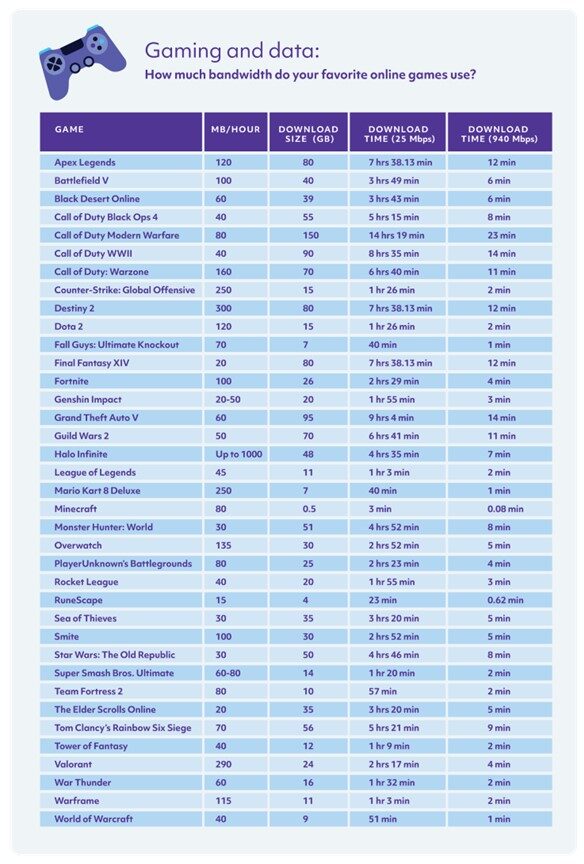
The average online game typically uses between 50MB to 150MB of data per hour for active gameplay. This figure can vary significantly depending on the game type, with fast-paced competitive shooters often being on the lower end due to efficient data packets, while open-world multiplayer games or large-scale MMOs might consume slightly more as they exchange richer environmental data.
Why does my internet feel slow even with a fast connection when gaming?
Even with high bandwidth, your internet can feel slow due to high latency (ping), packet loss, or network congestion. Ping measures the time it takes for data to travel to and from the game server; anything above 50ms can feel sluggish. Packet loss means data isn't arriving, causing stuttering. Congestion occurs when too many devices or applications are using your network simultaneously, starving your game of necessary resources.
How much bandwidth do game downloads and updates consume?
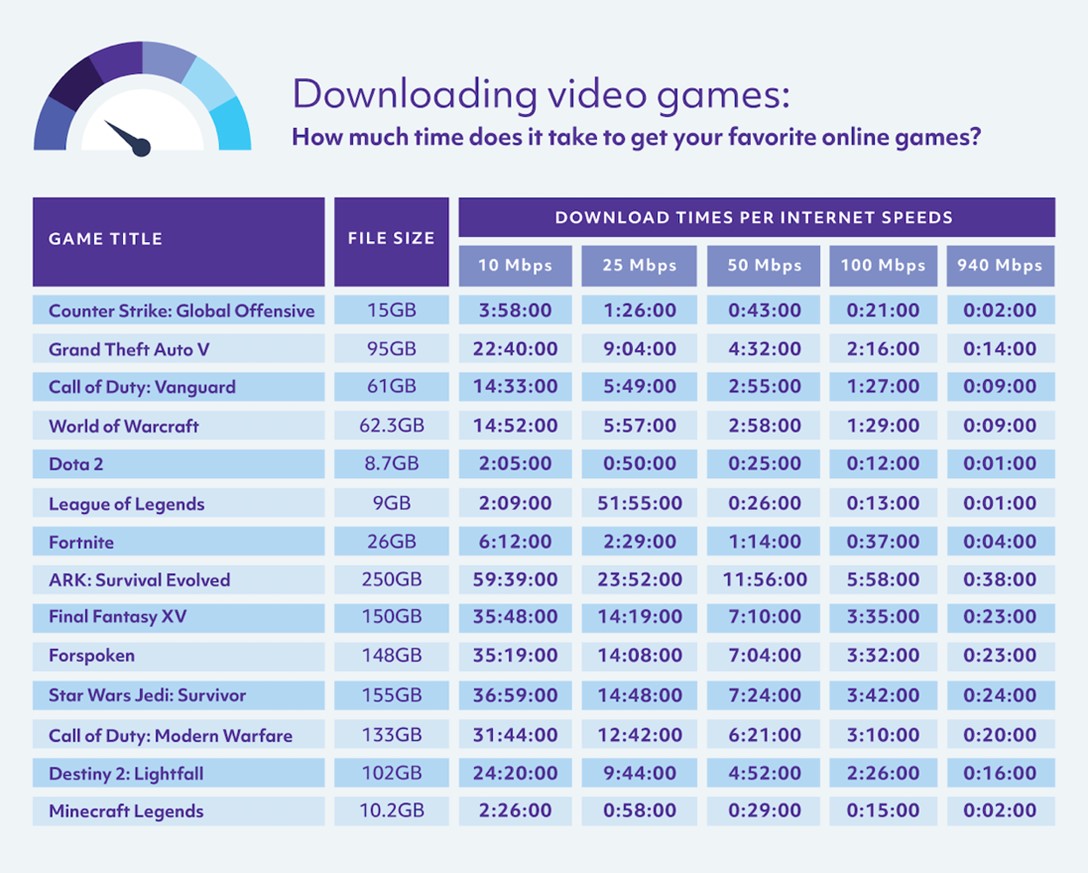
Game downloads and updates are by far the biggest bandwidth hogs. A new game can be anywhere from 50GB to over 200GB, while patches regularly range from 5GB to 50GB. This means a single large download can consume days' worth of typical gameplay bandwidth in a matter of hours, often requiring hundreds of gigabytes of data and potentially impacting monthly data caps.
Can using Wi-Fi instead of Ethernet affect gaming bandwidth?
Yes, using Wi-Fi can significantly impact your gaming experience compared to an Ethernet cable. Wi-Fi is prone to interference, signal degradation, and higher latency, which can lead to packet loss and inconsistent connection speeds. A wired Ethernet connection provides a more stable, faster, and lower-latency link directly to your router, ensuring your game data travels optimally.
What are the best settings on my router to optimize gaming bandwidth?
The best router setting for gaming bandwidth is Quality of Service (QoS). QoS allows you to prioritize gaming traffic over other data on your network, ensuring your game gets the lion's share of bandwidth when needed. Other helpful settings include disabling UPnP (Universal Plug and Play) if it causes issues and ensuring your router firmware is always up to date for optimal performance and security.
How does streaming video while gaming impact my overall bandwidth usage?
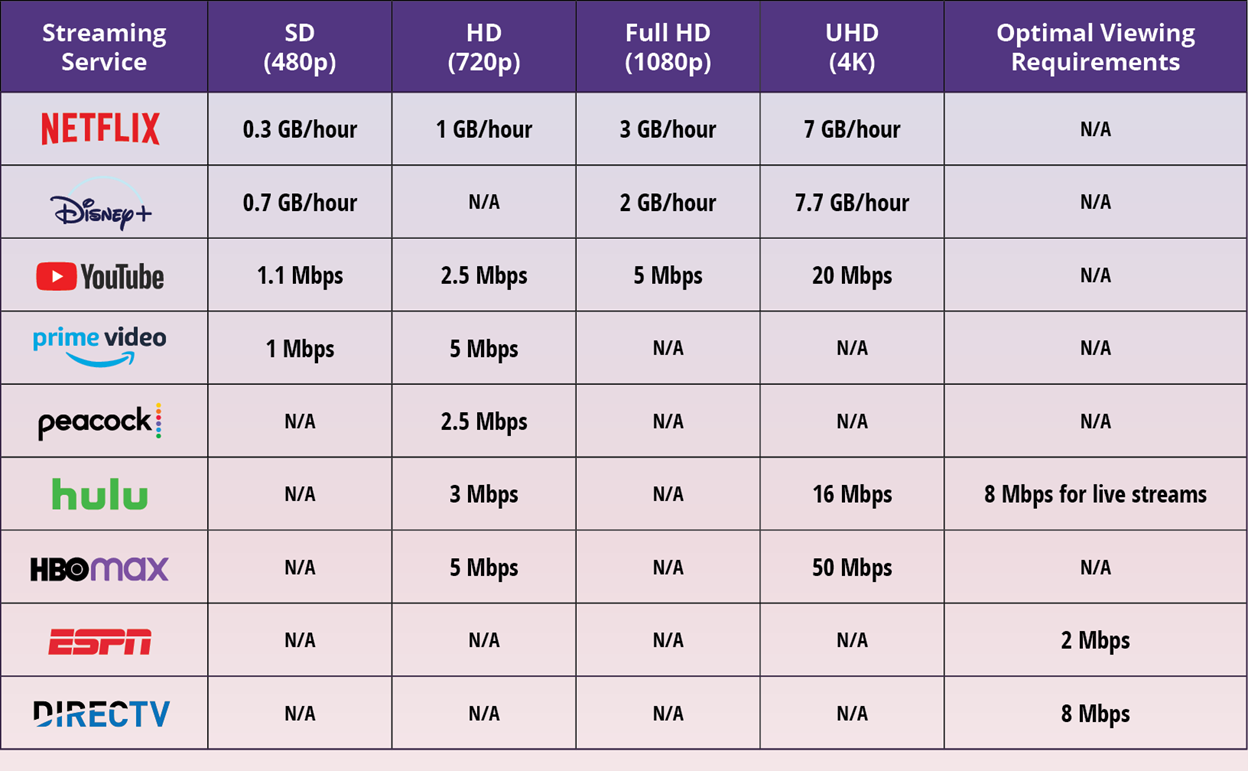
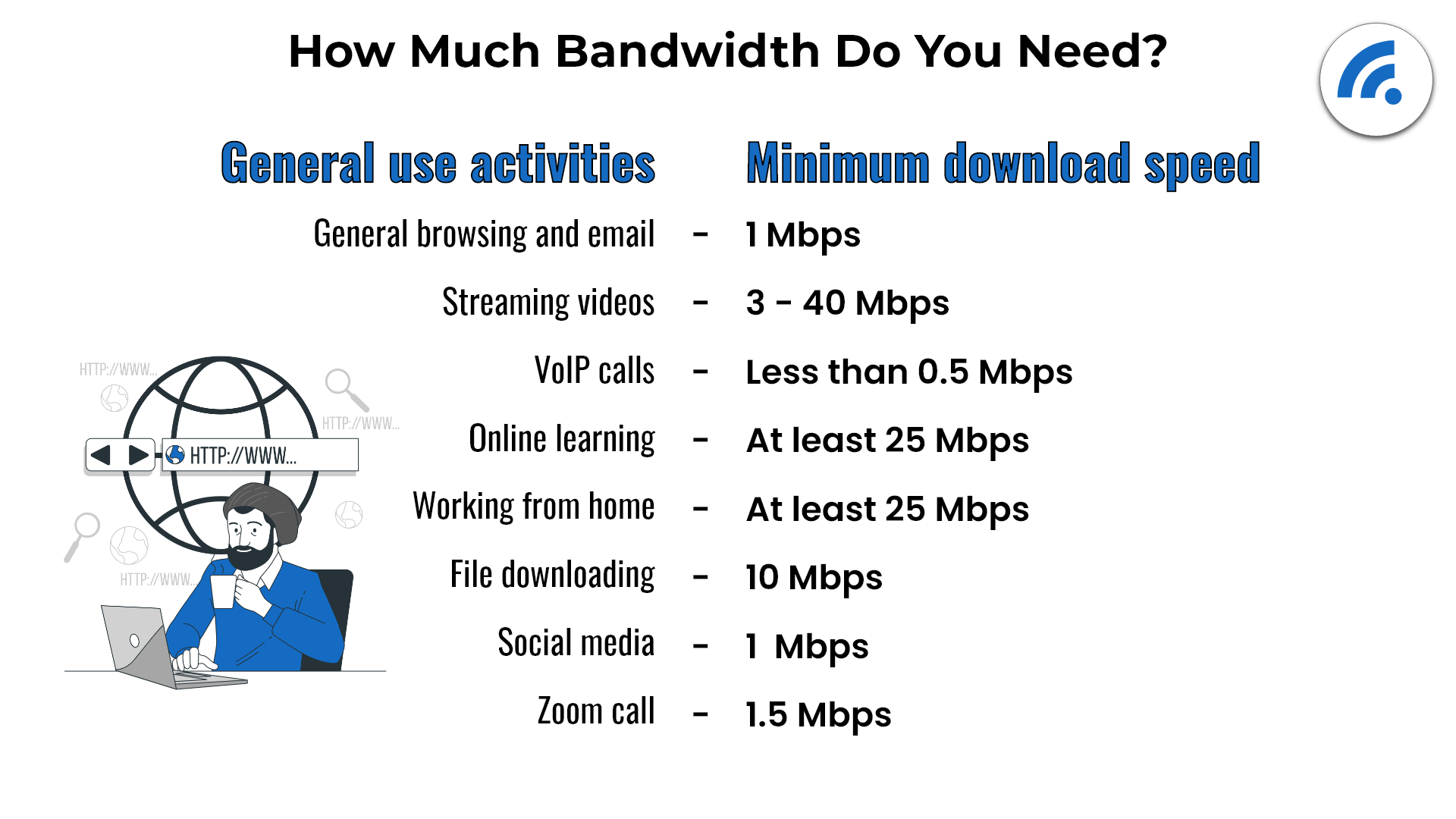
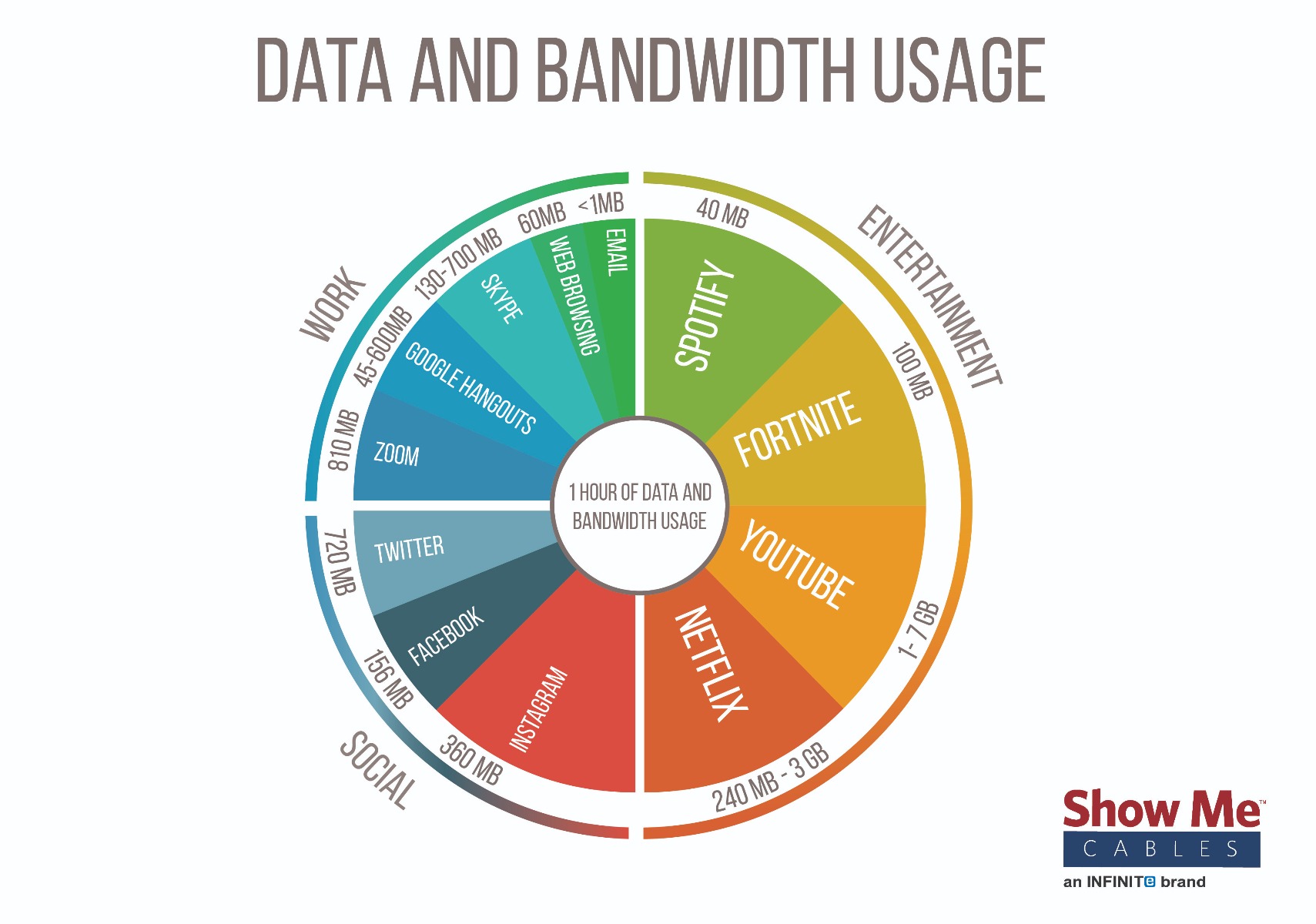
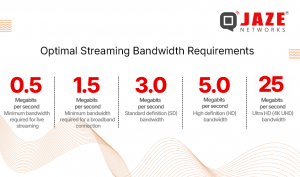
Streaming video, whether from Netflix, YouTube, or even a video call, drastically increases your bandwidth usage while gaming. A 1080p video stream can use 5-8 Mbps, while 4K streaming demands 20-30 Mbps. If you're also gaming (which needs its own bandwidth) or streaming your gameplay, these activities compete, potentially causing lag for everyone on the network if your total bandwidth is insufficient.
Are there specific internet plans recommended for serious gamers or streamers?
For serious gamers, an internet plan with at least 100-200 Mbps download and 10-20 Mbps upload is a good starting point for a single user. For streamers or households with multiple users and gamers, plans offering 300-500 Mbps download and 20-50 Mbps upload are highly recommended to ensure smooth gameplay, high-quality streaming, and simultaneous household activities without bottlenecks. Look for providers with low latency and reliable service.
In the bustling lives of today's US gamers, finding time to unwind, connect with friends, or hone skills in a favorite game is a precious commodity. For many, gaming isn't just a hobby; it's a vital escape, a social hub, and a mental challenge. But nothing sours that experience faster than frustrating lag, stuttering connections, or unexpected data overages. The silent culprit? Often, it's a misunderstanding of how much bandwidth gaming truly uses per hour.
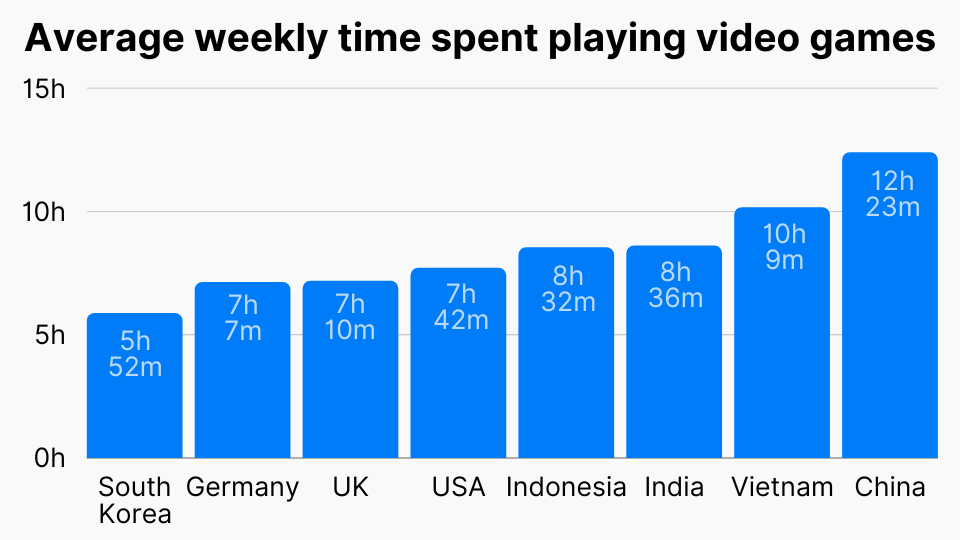
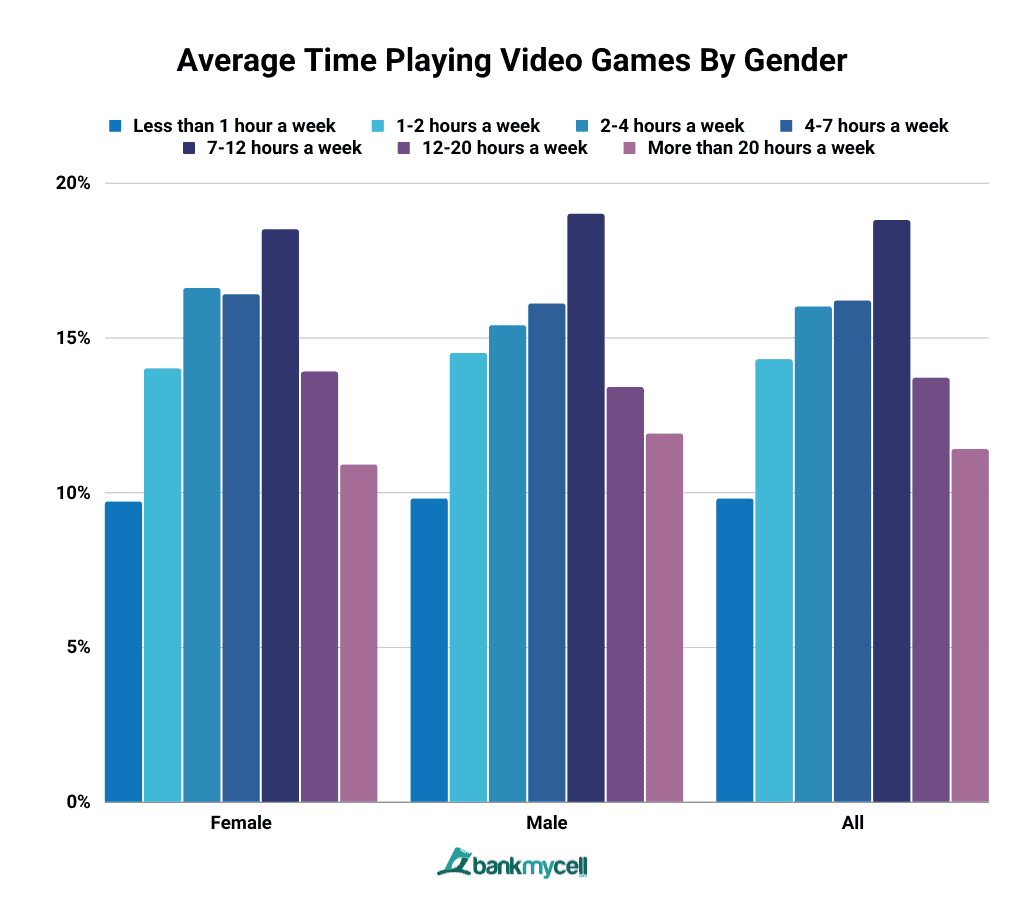
You're not alone if you've ever wondered if your internet plan is truly cut out for your gaming habits. The average US gamer, around 36 years old, often balances a demanding job and family life, valuing every minute of their gaming session. They want relaxation, fun, and seamless performance without the hype or technical headaches. With 87% of US gamers playing regularly and many dedicating 10+ hours a week, and mobile gaming continuing its dominance alongside PC and console cross-play, understanding your internet's capacity is more critical than ever. This guide is your trusted friend, here to demystify internet bandwidth and help you optimize your gaming experience, ensuring your virtual adventures are smooth, social, and supremely satisfying.
What Exactly is Bandwidth and How Does It Affect My Game?
Bandwidth is essentially the maximum amount of data that can be transferred over an internet connection in a given amount of time, typically measured in megabits per second (Mbps). Think of it like a highway: the wider the highway (higher bandwidth), the more cars (data) can travel simultaneously without congestion. For gamers, adequate bandwidth means your game data – your movements, opponents' actions, chat messages – travels to and from game servers quickly and efficiently. Insufficient bandwidth leads to dreaded lag, rubber-banding, and dropped connections, turning an enjoyable session into a frustrating chore.
How Much Bandwidth Do Different Game Types Really Consume Per Hour?
The amount of data a game uses varies significantly based on its genre, complexity, and whether you're actively downloading content or streaming. Online gaming itself, surprisingly, doesn't always consume massive amounts of data *per hour* for gameplay alone, but other factors add up quickly. Let's break down typical usage:
- Competitive FPS (e.g., Call of Duty, Valorant, Apex Legends): These games prioritize fast, responsive gameplay. They send small packets of data frequently. Expect around 50-150 MB per hour.
- MOBAs (e.g., League of Legends, Dota 2): Similar to FPS, these are optimized for low latency. Data usage typically ranges from 50-120 MB per hour.
- MMORPGs (e.g., World of Warcraft, Final Fantasy XIV): While they feature persistent worlds, the actual gameplay data for movement and actions isn't extremely high. Usage is often 100-200 MB per hour, but can spike during busy events.
- Open-World/Sandbox Multiplayer (e.g., Minecraft, Grand Theft Auto Online, Fortnite): These can be a bit more variable. While core gameplay is usually 100-250 MB per hour, interacting with complex environments or large numbers of players can push it higher.
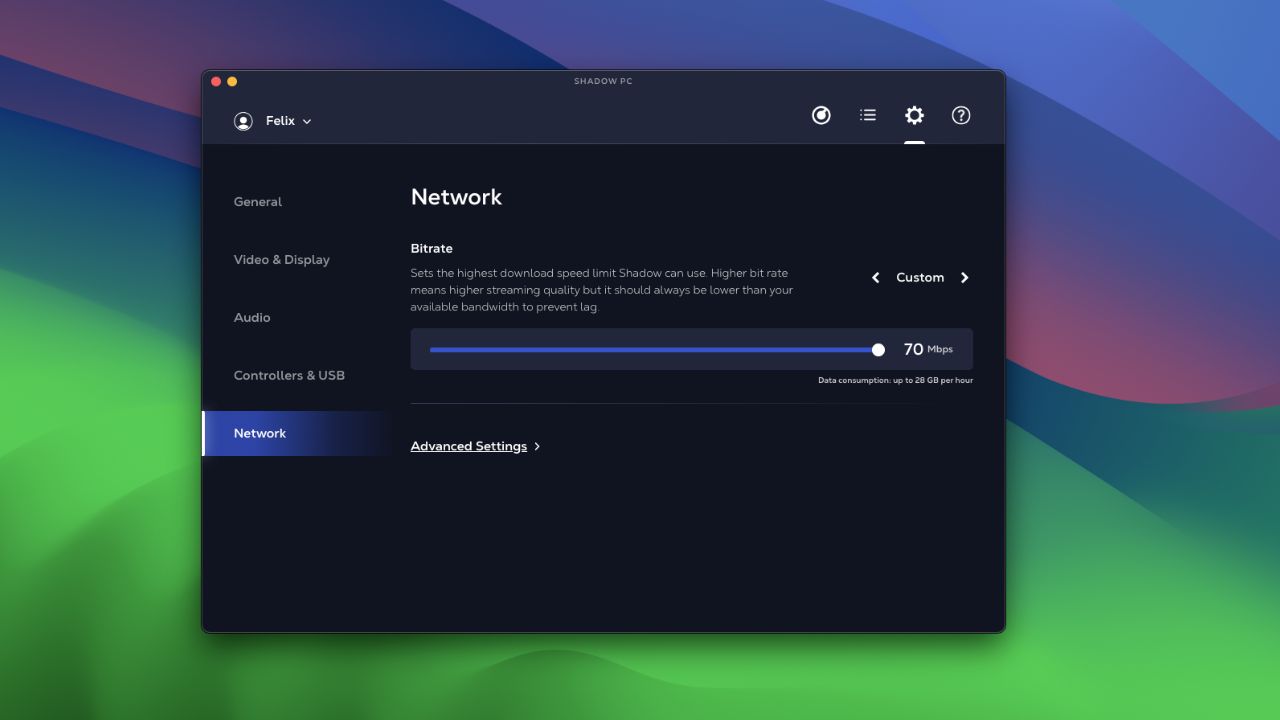
- Streaming Games (e.g., Google Stadia, Xbox Cloud Gaming): This is a different beast entirely. Since the game is rendered remotely and streamed to you like a video, it consumes significant bandwidth, often 5-15 GB per hour for 1080p resolution, much more for 4K.
These figures are for active gameplay only. Remember, anything else running on your network will compete for this bandwidth.
Does Streaming My Gameplay on Twitch or Discord Double My Data Use?
Absolutely, yes. If you're streaming your gameplay to platforms like Twitch, YouTube, or even sharing your screen on Discord, you're not only *downloading* game data but also *uploading* a high-quality video feed of your game. This upload stream can easily consume anywhere from 3-6 Mbps for 720p resolution, or 6-10+ Mbps for 1080p, adding significantly to your total bandwidth consumption. For a US gamer balancing aspirations of content creation with playing, this is a major factor to consider for your internet plan.
What's the Ideal Internet Speed for Lag-Free Online Gaming?
For a single gamer focused solely on multiplayer, a download speed of 25-50 Mbps and an upload speed of at least 5-10 Mbps is generally sufficient for a smooth, lag-free experience. However, this is a baseline. Most US households have multiple devices and users. If you have others streaming 4K video, attending video calls, or downloading large files simultaneously, you'll need more.
- For a household with multiple users/devices and one gamer: Aim for 100-200 Mbps download and 10-20 Mbps upload.
- For serious streamers or households with multiple simultaneous gamers: Consider 200-500+ Mbps download and 20-50+ Mbps upload.
Remember, stability (low latency/ping) is often more important than raw speed for gaming. A consistent 50 Mbps connection with low ping is better than an inconsistent 500 Mbps connection with high ping.
Are Game Updates and Downloads Major Bandwidth Hogs?
Yes, without a doubt! Game updates and new game downloads are the biggest consumers of bandwidth by far. Modern games often range from 50 GB to over 200 GB. A single 100 GB download can chew through a significant portion of a monthly data cap if you have one, or simply hog your entire network for hours. Many popular titles receive frequent patches and seasonal updates that can be several gigabytes each. It's common for gamers to schedule these downloads during off-peak hours or overnight to avoid impacting daytime internet usage for work or family.
Tips to Reduce Gaming Bandwidth Consumption Without Sacrificing Fun
Optimizing your bandwidth doesn't mean you have to stop playing or connecting with friends. Here are some practical tips:
- Use a Wired Connection (Ethernet): This is the golden rule. Wi-Fi introduces latency and potential packet loss. A direct Ethernet connection to your router provides the most stable and efficient data transfer.
- Enable Quality of Service (QoS) on Your Router: Many modern routers have QoS settings that allow you to prioritize gaming traffic over other activities on your network. This ensures your game gets the bandwidth it needs, even if someone else is streaming Netflix.
- Close Background Applications: Make sure no other programs are running downloads, updates, or streaming in the background on your gaming device. This includes cloud storage syncs, browser tabs, or even other game launchers.
- Adjust In-Game Settings: Some games allow you to reduce network update rates or disable certain visual elements that might be network intensive. While less common, it's worth checking.
- Disable Auto-Updates: Turn off automatic updates for games and your operating system. Schedule them manually for off-peak hours (e.g., overnight).
- Monitor Other Network Users: Communicate with family members about heavy internet use during your prime gaming hours. Perhaps they can download their movies earlier or stream at a lower resolution.
How Can I Monitor My Gaming Data Usage Effectively?
Staying on top of your data consumption is key, especially if you have a data cap. Here's how:
- Router Interface: Many routers have built-in traffic monitors that show total data used by connected devices. Log into your router's admin page (usually via a web browser).
- Operating System Tools:
- Windows: Go to 'Settings' > 'Network & Internet' > 'Data usage'. You can see a breakdown of data used by apps.
- macOS: Use 'Activity Monitor' > 'Network' tab.
- ISP Data Usage Tools: Most Internet Service Providers (ISPs) offer online portals or mobile apps where you can track your monthly data consumption. This is crucial for avoiding overage fees.
- Third-Party Monitoring Software: Tools like NetLimiter or GlassWire provide detailed real-time monitoring of application-specific data usage on Windows.
Will 5G or Mobile Hotspots Provide a Reliable Connection for Gaming?
5G and mobile hotspots have come a long way, and for casual or less demanding games, they can work surprisingly well, especially for mobile-first gamers. However, for competitive PC or console gaming, they often present challenges:
- Latency (Ping): While 5G speeds can be very fast, the latency can still be higher and less consistent than a wired fiber or cable connection, leading to noticeable lag.
- Data Caps: Mobile data plans, even unlimited ones, often have soft caps or throttling after a certain usage threshold, which can severely impact performance for large game downloads or extended play sessions.
- Stability: Mobile connections can be more susceptible to environmental factors, signal strength fluctuations, and network congestion, leading to drops or inconsistent performance.
They are excellent for gaming on the go or as a backup, but for your main gaming setup, a dedicated home internet connection is generally superior.
What Role Does Ping Play in Gaming Performance Beyond Bandwidth?
While bandwidth dictates how much data can flow, ping (or latency) measures how quickly data travels to and from the game server. It's measured in milliseconds (ms). Low ping is critical for responsive gaming, especially in fast-paced titles like FPS or fighting games. Even with high bandwidth, high ping will cause lag. Factors affecting ping include your physical distance from the game server, your internet service provider's network quality, and network congestion. Always aim for a ping below 50ms for optimal online play.
How Do Household Devices Impact My Gaming Bandwidth?
Every device connected to your home network consumes a piece of your total bandwidth. A household with a gamer often has multiple smartphones, smart TVs, streaming devices, smart home gadgets, and even other computers. When family members are simultaneously streaming 4K movies, video conferencing for work, or downloading large files, it directly competes with your game for data. This is why having enough overall bandwidth for your household, and prioritizing gaming traffic using QoS, is essential for a harmonious digital home where everyone can enjoy their online activities without interruption.
Can Upgrading My Router Improve My Gaming Bandwidth Performance?
Yes, absolutely! An outdated or low-quality router can be a significant bottleneck, even if you pay for high-speed internet. Newer routers, especially those supporting Wi-Fi 6 (802.11ax) or Wi-Fi 6E, offer improved efficiency, faster speeds, and better handling of multiple devices. Features like Quality of Service (QoS) management, dedicated gaming ports, and stronger processors can prioritize gaming traffic and reduce latency. Upgrading to a mesh Wi-Fi system can also improve coverage and stability in larger homes, ensuring a strong signal reaches your gaming setup.
Is a Faster Internet Plan Always Necessary for Better Gaming?
Not always. While sufficient bandwidth is crucial, simply buying the fastest plan available might be overkill if your current setup already meets your needs. For most single gamers, speeds above 100-200 Mbps offer diminishing returns for *gameplay* itself. The real benefits of ultra-high speeds (500 Mbps or 1 Gbps+) come into play for large households with multiple streamers, heavy downloaders, or 4K game streaming services. Before upgrading your plan, first ensure your router is optimized, you're using a wired connection, and background apps aren't hogging resources. Often, addressing these internal network issues provides a better performance boost than just more raw speed.
Understanding how much bandwidth gaming uses per hour doesn't have to be a complex puzzle. By knowing the demands of your favorite games, managing background tasks, and optimizing your home network, you can transform your gaming experience from frustrating to fantastic. For the busy US gamer, this means more relaxation, more fun with friends, and more time enjoying the hobbies that truly matter. Don't let a bottlenecked connection steal your precious gaming moments.
FAQ Section
Q: Does gaming use more upload or download bandwidth?
A: Online gaming primarily uses more download bandwidth to receive game world data, but it also requires a stable upload speed to send your actions to the server. Streaming your gameplay, however, heavily relies on upload bandwidth.
Q: Can I game effectively on a limited data plan?
A: For pure online gameplay, yes, as it uses relatively little data per hour. However, large game downloads, updates, or streaming will quickly exhaust limited data plans. Schedule these activities on unlimited Wi-Fi if possible.
Q: What is packet loss and how does it affect gaming?
A: Packet loss occurs when data packets fail to reach their destination. It manifests as stuttering, rubber-banding, and unresponsive controls in games, often due to network congestion or poor Wi-Fi signal. A wired connection often helps mitigate this.
Q: Should I worry about my internet's data cap for gaming?
A: For active online gameplay, it's usually not an issue unless your cap is extremely low. However, frequent game downloads, patches, or 4K game streaming can quickly consume hundreds of gigabytes, making data caps a significant concern for many gamers.
Q: Does playing games offline consume any bandwidth?
A: No, playing games completely offline (without any internet connection) consumes zero bandwidth. However, even single-player games might require an internet connection for initial activation, patches, or DLC downloads.
Q: How does playing cross-platform affect my bandwidth usage?
A: Playing cross-platform doesn't inherently change your bandwidth usage per hour compared to playing on a single platform. The data consumed depends on the game itself, not whether players are on different systems. It's the same amount of game data being exchanged.
What's your biggest gaming challenge when it comes to your internet connection? Comment below and let's troubleshoot it together!
Average online gaming uses 50-300 MB per hour depending on game type. Downloads and streaming consume significantly more bandwidth. Competitive FPS games typically use less data than large open-world MMOs. An ideal internet speed for a single gamer is 25-50 Mbps, but more is needed for multiple users or 4K streaming. Optimizing network settings like QoS and using wired connections can drastically improve performance and reduce data spikes. Monitoring your data usage can prevent unexpected overage charges.
35

Xbox Cloud Gaming Data Usage How Much Data XCloud Uses Per Hour 2025 Xbox Cloud Gaming Data Usage 2025.webp. What Games Use The Most Bandwidth 1 . What Games Use The Most Bandwidth 3 . Gamers Are Using All Our Data Bandwidth And Oth Tumbex Tumblr Inline 400.pnj. What Fibre Speed Do I Need For Netflix Gaming And Streaming Streaming Chart

Gaming And Bandwidth Use In The Most Popular Online Games Quantum Fiber 585x410 . How Much Data Does Online Gaming Use GB Hour How Much Data Does Gaming Use 768x427 . How Much Data Does Cloud Gaming Use Per Hour 2026 Shadow Pc Bitrate Settings 70mbps 28gb Per Hour . How Much Data Does Streaming Use HD 4K Music Gaming Image. Bandwidth Vs Internet Speed The Differences Explained 2. How Much Bandwidth Do You Need

How Much Data Does Streaming Use HD 4K Music Gaming Cablepapa Logo.webp. Which Countries Dominate Steam Bandwidth Usage In 2024 32a85a1d 26a0 42d7 8810 1920x1080 . PC Gaming Market Share And Usage Statistics 2026 Trends SQ Magazine Gaming Hardware Adoption And 260x195 . 16 Online Gaming Statistics That Show The Scale Of The Industry Is In G3 Timespent . Game Industry Usage And Revenue Statistics 2026 Gaming Revenue

Cloud Gaming Usage Statistics 2026 Surprising Growth Trends Revealed Cloud Gaming Usage By Device Type . How Much Power Does A Gaming PC Use Per Hour Guide Tips V2 15f5m5 Fi98o . 45 Video Game Addiction Statistics 2026 How Many People Are Addicted Average Weekly Time Spent Playing Video Games . How To Sit In A Gaming Chair How Much Bandwidth Does Gaming Use . How Much Data Does Online Gaming Use Update 05 2026 How Much Data Does Online Gaming Use 3

Gigabit Usage GraphSMC 02 002 Final . How Much Bandwidth Does Gaming Use AEANET Technology Question Guide.webp. How Many People Play Video Games In The World 2026 S52 9 Average Time Playing Video Games Gender . Optimizing Your Streaming Bandwidth Essential Tips For Smooth Bandwidth 300x177 . Explosive 2025 Broadband Data Usage Surge Gaming Sports How Online G1 Overview



Gaming Industry Statistics And Revenue Data 2026 Icon Era Statistics Gaming Industry Revenue Statistics 2026 . How Much Data Does Cloud Gaming Use Per Hour 2026 Best Cloud Gaming Handheld 1024x576 . How Much Data Does Cloud Gaming Use Per Hour 2026 Best Cloud Gaming Controller 1024x576 . How Much Bandwidth Does Gaming Use AEANET Cropped Logo . How Much Does Online Gaming Use Bandwidth Robots Net How Much Does Online Gaming Use Bandwidth 1691123297

PCIe Bottleneck Do Bandwidth Limits Actually Matter Mid Range GPU PCIe Bandwidth Usage Graph 1024x683 . Bandwidth And The Rise Of Online Gaming Plusnet Community Online Gaming And Bandwidth Plusnet Small . Hourly Data Usage Of Online Gaming What You Need To Know Hourly Data Usage Of Online Gaming 1024x538 . VR Wireless Bandwidth Calculator How Much Wi Fi Speed Does PCVR Really VR Wireless Bandwidth Calculator How Much Wi Fi Speed Does PCVR Really Need 1160x773 . Gaming Console Statistics And Facts 2026 Time Spent Playing Games From The Call Of Duty Series In A Typical Week 768x525