Navigating the complexities of PC hardware upgrades can be a challenge for busy gamers seeking optimal performance without breaking the bank or sacrificing precious game time. This comprehensive guide explores whether RAID 0 truly enhances gaming experiences, particularly for the modern US gamer who balances work, family, and a passion for digital worlds. We delve into how RAID 0 functions, its potential benefits in terms of load times and system responsiveness, and crucial drawbacks like data redundancy. With the rise of lightning-fast NVMe SSDs, understanding RAID 0's relevance is more important than ever. This resource aims to provide clear, actionable insights into whether this classic storage configuration is a smart move for your gaming rig in 2026, helping you make informed decisions about your hardware investments and ensuring your valuable gaming moments are as smooth and enjoyable as possible. Discover if RAID 0 is the performance boost you need or if alternative solutions offer better value for your gaming dollar.
Is RAID 0 worth it for a new gaming PC build in 2026?
For most new gaming PC builds in 2026, RAID 0 with traditional SATA SSDs is generally not worth it. A single high-performance NVMe SSD (Gen4 or Gen5) typically offers comparable or superior game load times, easier setup, and no data loss risk, making it a much more practical and reliable choice for the average gamer. If you're considering extreme speeds with multiple NVMe drives in RAID 0, the complexity and data risk still outweigh the marginal gaming benefits for many.
How much faster are game load times with RAID 0 compared to a single SSD?
Game load times with RAID 0 can be noticeably faster than a single SATA SSD, potentially cutting loading screens by 20-50% depending on the game and drive speeds. However, when comparing a RAID 0 array of SATA SSDs to a modern, single NVMe SSD, the NVMe often matches or surpasses the RAID 0 performance. The actual speed boost varies significantly per game and system configuration, making it hard to give a universal percentage.
What are the specific risks of using RAID 0 for my entire game library?
The specific risks of using RAID 0 for your entire game library are significant data loss if any drive in the array fails. Since RAID 0 provides no fault tolerance, a single drive malfunction means your operating system, all installed games, save files, and any other data on that RAID 0 volume will be irrecoverably lost. This can be a major headache for gamers who've invested hundreds of hours into game progress or have large digital game collections.
Does RAID 0 affect FPS (frames per second) in games?
No, RAID 0 does not affect your FPS (frames per second) in games. The primary components influencing your FPS are your graphics card (GPU), processor (CPU), and RAM. RAID 0 improves data read/write speeds, which translates to faster game loading, level transitions, and asset streaming, but it has no direct impact on how many frames your system can render per second during gameplay.
Can I create a RAID 0 array with different sized SSDs?
Technically, you can create a RAID 0 array with different sized SSDs, but it's strongly discouraged. When using drives of different capacities in RAID 0, the total usable storage capacity will be limited to the size of the smallest drive multiplied by the number of drives. For example, if you use a 500GB and a 1TB SSD, your RAID 0 array will only provide 1TB of usable space (2 x 500GB), wasting half of the larger drive's capacity and potentially causing performance inconsistencies.
Is it difficult to set up RAID 0 on my gaming motherboard?
Setting up RAID 0 on a gaming motherboard isn't overly difficult for an experienced PC builder, but it's more complex than simply plugging in a single drive. It requires enabling RAID mode in your motherboard's BIOS/UEFI, entering a separate RAID configuration utility to create the array, and potentially loading specific RAID drivers during OS installation. For beginners, it can be a somewhat intimidating process compared to standard drive installation.
What are the main advantages of a single NVMe SSD over RAID 0 for gamers today?
The main advantages of a single NVMe SSD over a RAID 0 array (especially SATA-based) for gamers today include superior or comparable speed for most gaming tasks, significantly simpler installation and management, and zero risk of data loss due to drive failure within the storage solution itself. NVMe drives are also more power-efficient and take up less physical space, aligning with modern PC build preferences for performance and convenience.
Hey fellow gamers! Ever find yourself staring at a loading screen, wishing your favorite title would just, well, load faster? We all know that feeling. In a world where 87% of US gamers play regularly, often dedicating 10+ hours a week, and many of us are balancing demanding jobs, family life, and social commitments, every second counts. We game to relax, unwind, connect with friends, or simply escape into incredible virtual worlds. The last thing we need is our hardware holding us back. That's why questions about performance optimization, like "does RAID 0 improve gaming," pop up so frequently. We're always looking for that edge, that upgrade that makes our limited gaming time even more enjoyable without plunging us into endless troubleshooting. Let's cut through the hype and dive into whether RAID 0 is still a viable path to faster, smoother gaming in 2026, or if there are smarter, more budget-friendly ways to supercharge your rig.
We'll explore what RAID 0 actually does, its real-world impact on game load times versus in-game performance, and the crucial trade-offs you need to consider. We'll also look at how modern storage technologies, like NVMe SSDs, have changed the landscape. By the end of this guide, you'll have a clear understanding of whether a RAID 0 setup is the right move for your gaming PC, helping you invest wisely and get back to what matters most: playing games!
What Exactly is RAID 0 and How Does It Work?
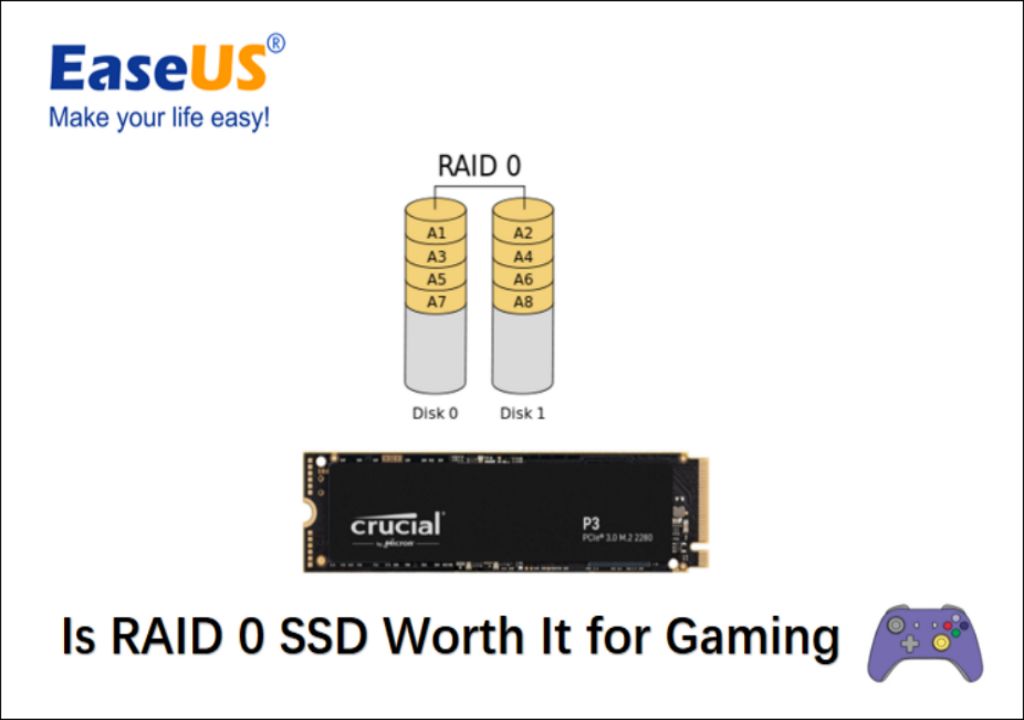
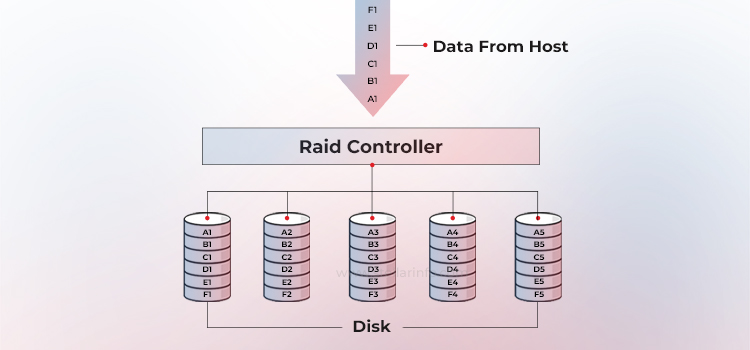
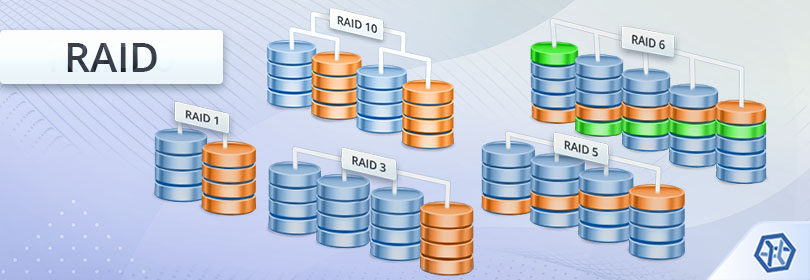
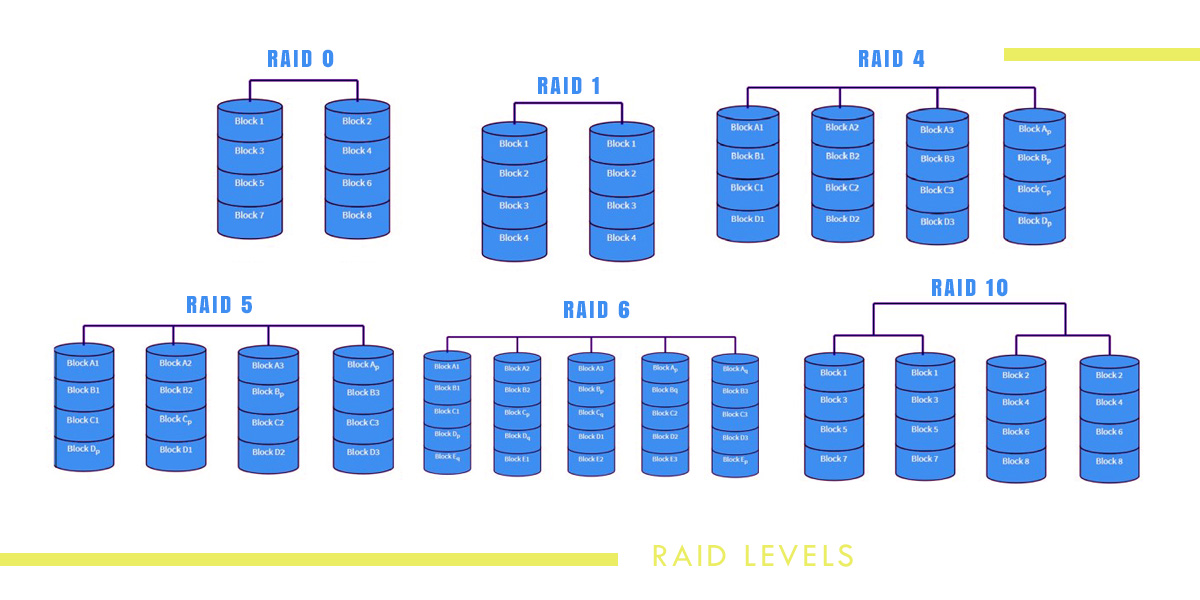
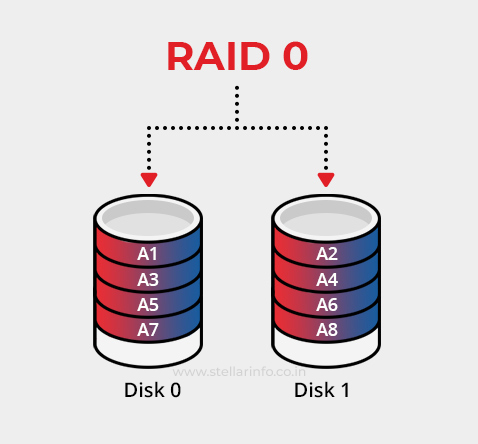
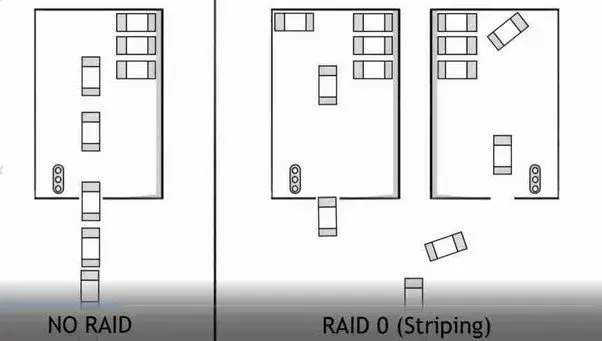
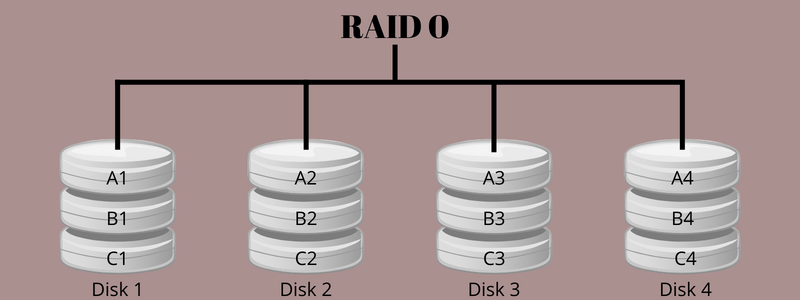
RAID 0, often called "striping," is a way of configuring two or more hard drives or solid-state drives (SSDs) to work together as a single, larger, and faster logical unit. Instead of writing data sequentially to one drive, the data is split into blocks and simultaneously written across all drives in the array. Imagine two workers building a wall: instead of one worker placing bricks one after another, both workers place bricks at the same time on different parts of the wall. This parallel operation is what gives RAID 0 its speed advantage.
For gamers, this means potentially quicker read and write speeds when loading games, saving game progress, or installing new titles. The system perceives the RAID 0 array as a single, super-fast drive. While it offers significant performance boosts over a single traditional hard drive, it's crucial to understand its primary trade-off: data redundancy. RAID 0 provides no fault tolerance; if one drive in the array fails, all data on *both* drives is lost. This is why it's often referred to as a "high-risk, high-reward" setup.
Does RAID 0 Actually Improve Gaming Performance?
When gamers ask "does RAID 0 improve gaming," they're usually thinking about two things: frame rates (FPS) and load times. Let's be clear: RAID 0 primarily improves game load times, level transitions, and asset streaming, but it does NOT directly increase your in-game frame rates. Your GPU, CPU, and RAM are the components responsible for rendering graphics and processing game logic, which directly impact FPS.
Where RAID 0 shines is in how quickly your system can access game files. If you're tired of waiting several minutes for a large open-world game to load, or experiencing stutters during zone transitions, RAID 0 can offer a noticeable improvement. It helps reduce the "bottleneck" that slower storage can create, allowing game assets to be pulled from storage and into your system memory much faster. For instance, a game that takes 60 seconds to load on a single SATA SSD might load in 40 seconds on a RAID 0 array, or even faster on NVMe. This can be a huge quality-of-life improvement, especially when you only have a short window to game after work or before family dinner.
What Are the Real-World Benefits for Gamers Using RAID 0?
For the average gamer, balancing life and leisure, every little optimization counts. Here are the practical benefits RAID 0 can offer:
- Faster Game Load Times: This is the biggest selling point. Games, especially modern titles with massive open worlds and high-resolution textures, involve loading gigabytes of data. RAID 0 speeds up this process significantly.
- Quicker Level Transitions: Moving from one area to another in a game can often involve another loading screen. RAID 0 helps minimize these interruptions.
- Reduced Stuttering from Asset Streaming: In some games, assets are streamed dynamically as you play. Faster storage can reduce micro-stutters that occur when the game engine is waiting for data to load from the drive.
- Snappier System Responsiveness: Beyond just games, your entire operating system and applications that reside on the RAID 0 array will feel faster and more responsive, from boot-up to launching Discord or your favorite browser.
- Efficient Game Installation: Installing those massive 100GB+ titles can take ages. RAID 0 can significantly cut down installation times.
Considering that many US gamers spend 10+ hours a week gaming, shaving off even 10-20 seconds per load screen can add up to valuable minutes over a month, giving you more actual playtime.
Are There Any Downsides to Using RAID 0 for Gaming?
Absolutely, and these downsides are crucial to understand before you commit to a RAID 0 setup. It's not a magic bullet without trade-offs.
The biggest con is the increased risk of data loss. With RAID 0, if *any* single drive in the array fails, you lose *all* data across *all* drives in that array. This means your entire game library, save files, screenshots, and any other data stored on the RAID 0 volume would be gone. This is a significant consideration, especially for gamers who have invested countless hours into game saves or digital purchases that aren't easily replaceable. Imagine losing your hundreds of hours in a single-player RPG or all your screenshots from a memorable multiplayer match.
Another point is the setup complexity. While not overly difficult for tech-savvy individuals, it's more involved than simply plugging in a single drive. You'll need compatible motherboard support (often found on higher-end gaming motherboards), and you'll need to configure it in your BIOS/UEFI before installing your operating system. For those who want a plug-and-play experience, this can be a deterrent.
Finally, there's the cost. You need at least two drives for RAID 0. While the per-gigabyte cost of SSDs has dropped, buying two can still be more expensive than a single, larger drive. And for the performance gains, especially with modern NVMe, the cost-benefit analysis needs careful thought.
Is RAID 0 Still Relevant with Modern SSDs and NVMe Drives?
This is where the discussion gets really interesting in 2026. For a long time, RAID 0 with traditional SATA SSDs was the go-to for maximum storage speed. However, the advent of NVMe (Non-Volatile Memory Express) SSDs has fundamentally changed the landscape.
NVMe drives connect directly to your motherboard's PCIe lanes, bypassing the slower SATA interface. A single high-end NVMe drive can offer sequential read/write speeds that *exceed* a RAID 0 array of two SATA SSDs. For example, a good Gen4 NVMe drive can hit 7000 MB/s reads, while two SATA SSDs in RAID 0 might max out around 1100 MB/s. Even Gen5 NVMe drives are pushing speeds well over 10,000 MB/s. This means that for many gamers, simply buying a single, fast NVMe SSD provides superior performance to a SATA SSD RAID 0 array, with less complexity and zero data loss risk.
So, does RAID 0 improve gaming when NVMe exists? Yes, but only in specific scenarios. You could create a RAID 0 array of *multiple NVMe drives* (if your motherboard supports it) for truly extreme speeds. However, the performance difference for gaming beyond a single fast NVMe is often negligible in real-world use cases, and the cost and increased data risk remain. For the average gamer, a single NVMe drive often offers the best balance of speed, simplicity, and safety.
How Do I Set Up RAID 0 for My Gaming PC?
Setting up RAID 0 requires a few steps and careful attention. Please back up any critical data before attempting this, as you will format the drives!
- Check Motherboard Compatibility: Ensure your motherboard supports RAID and has enough SATA ports (for SATA SSDs) or M.2 slots (for NVMe SSDs). Most modern gaming motherboards do.
- Enable RAID in BIOS/UEFI: Boot into your motherboard's BIOS/UEFI settings. Look for Storage Configuration, SATA Mode, or NVMe RAID settings. Change the mode from AHCI to RAID. Save and exit.
- Create the RAID Array: Reboot, and during POST (Power-On Self-Test), there will usually be a prompt (e.g., Ctrl+I for Intel, or a specific key for AMD RAIDXpert) to enter the RAID configuration utility. Follow the prompts to create a new RAID 0 volume. Select the drives you want to include.
- Install Operating System: Boot from your Windows installation media. When it asks where to install Windows, you should see your newly created RAID 0 volume as a single drive. Proceed with the installation. You might need to load RAID drivers if Windows doesn't recognize the array initially.
- Install Drivers: After Windows is installed, install all necessary motherboard drivers, especially the RAID controller drivers, from your motherboard manufacturer's website.
This process can be a bit daunting for first-timers, but there are many online tutorials and guides specific to your motherboard model that can walk you through it.
What Are Alternatives to RAID 0 for Faster Gaming?
If the data loss risk or complexity of RAID 0 scares you (and for many busy gamers, it should!), there are excellent alternatives that offer fantastic performance gains without the headaches:
- Single NVMe SSD: As discussed, a high-quality Gen4 or Gen5 NVMe SSD is often the best single upgrade for load times. It's fast, simple, and reliable. Many US gamers are adopting NVMe as prices become more accessible.
- Larger Capacity SSDs: Instead of two smaller drives in RAID 0, consider one larger SATA or NVMe SSD. This simplifies management and often offers a better cost-per-gigabyte, allowing you to store more games on your fastest drive.
- Separate Game Drive: Keep your operating system on a smaller, fast SSD (NVMe is ideal) and have a second, larger SSD (SATA or NVMe) dedicated solely to games. This separates your critical OS data from your game library.
- Hybrid Setup: If you have a massive game library and budget is a concern, you could have your absolute favorite, most-played games on a fast NVMe, and less demanding or older titles on a larger, cheaper SATA SSD or even a large hard drive.
Remember, the goal is often to balance performance, cost, and reliability. For most gamers in 2026, a single fast NVMe drive offers the sweet spot.
When Should a Gamer Consider RAID 0?
While often overshadowed by NVMe, RAID 0 still has niche applications where it makes sense, particularly for specific types of gamers or content creators who also game.
- Extreme Enthusiasts: If you're building a top-tier system with multiple NVMe drives and want to push every benchmark to its absolute limit, even if the real-world gaming difference is minimal.
- Workstation/Gaming Hybrids: If your PC doubles as a video editing workstation or for tasks that genuinely benefit from incredibly high sequential read/write speeds, and gaming is a secondary consideration. These users might already have robust backup solutions in place.
- Budget SATA SSDs: If you already own two identical SATA SSDs and want to maximize their performance *without* buying a new, faster NVMe drive, and you understand and accept the data loss risk. This is more of a legacy approach now.
For the majority of gamers who want fast load times without worrying about complex setups or losing their game saves, a single, high-performance NVMe SSD is generally the recommended path today. It aligns perfectly with the desire for hassle-free, enjoyable gaming experiences that busy adults seek.
What is the primary benefit of RAID 0 for gamers?
The primary benefit of RAID 0 for gamers is significantly faster game load times and quicker transitions between levels or zones within games. By striping data across multiple drives, the system can read and write game files much faster than a single drive, reducing frustrating waits.
Does RAID 0 improve in-game frame rates (FPS)?
No, RAID 0 does not directly improve in-game frame rates (FPS). Your FPS is primarily determined by your graphics card (GPU), processor (CPU), and RAM. RAID 0 only affects how quickly data is loaded from storage, not how it's processed once in memory.
What is the biggest risk of using RAID 0 for gaming?
The biggest risk of using RAID 0 is data loss. If even one drive in the RAID 0 array fails, all data across all drives in that array will be lost because there is no data redundancy or fault tolerance built into the RAID 0 configuration.
Is RAID 0 still relevant with modern NVMe SSDs?
For most gamers, a single high-performance NVMe SSD often provides superior or comparable gaming load times to a SATA SSD RAID 0 array, with less complexity and zero data loss risk. RAID 0 with multiple NVMe drives can offer even higher speeds but with diminishing returns for typical gaming and increased cost/risk.
How many drives do I need for a RAID 0 setup?
You need a minimum of two identical drives (either HDDs or SSDs) to create a RAID 0 array. While you can technically use more, two is the most common configuration for gamers and offers a significant speed boost over a single drive.
So, does RAID 0 improve gaming? For faster load times, yes, it can. But the landscape has shifted dramatically with NVMe SSDs. For most of us balancing work, family, and our passion for gaming, a single, high-speed NVMe drive offers the best blend of performance, reliability, and ease of use. It lets you spend less time waiting and more time enjoying the incredible worlds developers create, often without the headache or risk of a RAID 0 setup. What's your biggest gaming storage challenge? Comment below and let's help each other out!
RAID 0 can significantly increase storage read/write speeds. It does not directly improve in-game frame rates (FPS). Primary benefit is faster game load times and level transitions. Higher risk of data loss if one drive fails. Modern NVMe SSDs often outperform traditional SATA RAID 0 setups. Best for users prioritizing speed over data safety on a budget.
34



RAID RAID 0 1 5 10 2026 Image 20 . RAID Calculator Compare RAID 0 1 5 6 10 Capacity Speed RAID Calculator 768x417 . Does RAID 0 Increase Gaming Performance Darwin S Data . Differents RAID 0 Setup Comparison X4 X3 X2 X1 Ssd Pcie 4 0 R Gamingpc Differents Raid 0 Setup Comparison X4 X3 X2 X1 Ssd Pcie 4 0 V0 . Notebook Nvme Ssd Raid 0 2026 Https Www Com Nvme Ssd Raid 0 Performans Testleri 2026


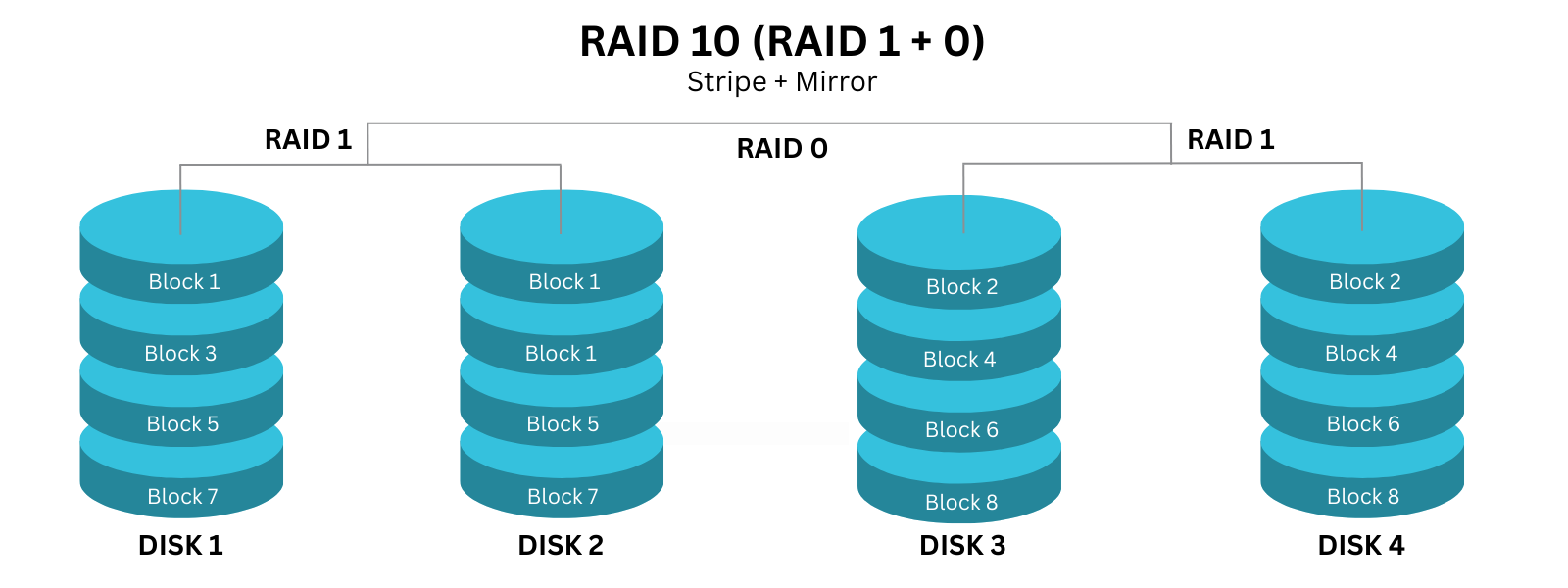
What Is RAID 0 Striping How Does It Work Its Pros Cons Parity RAID . What Is RAID 0 Boosting Performance With Data Striping RAID 01 Vs RAID 10 . Raid Storage Technology PPTX Raid Storage Technology 9 320 . RAID 0 E RAID 1 A Confronto Vantaggi E Svantaggi 2026 RAID 0 Vs. RAID 1 . A Guide To RAID And How It Works 1 Grid Knowledge Base Copy Of 1 Grid Images For KB Articles 1000 X 600 Px 37
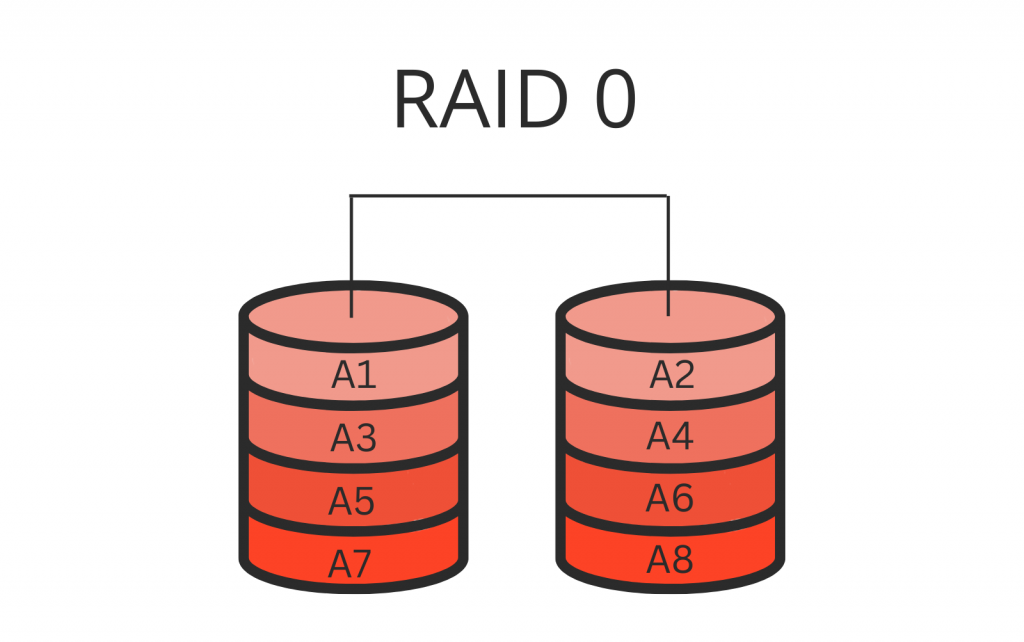

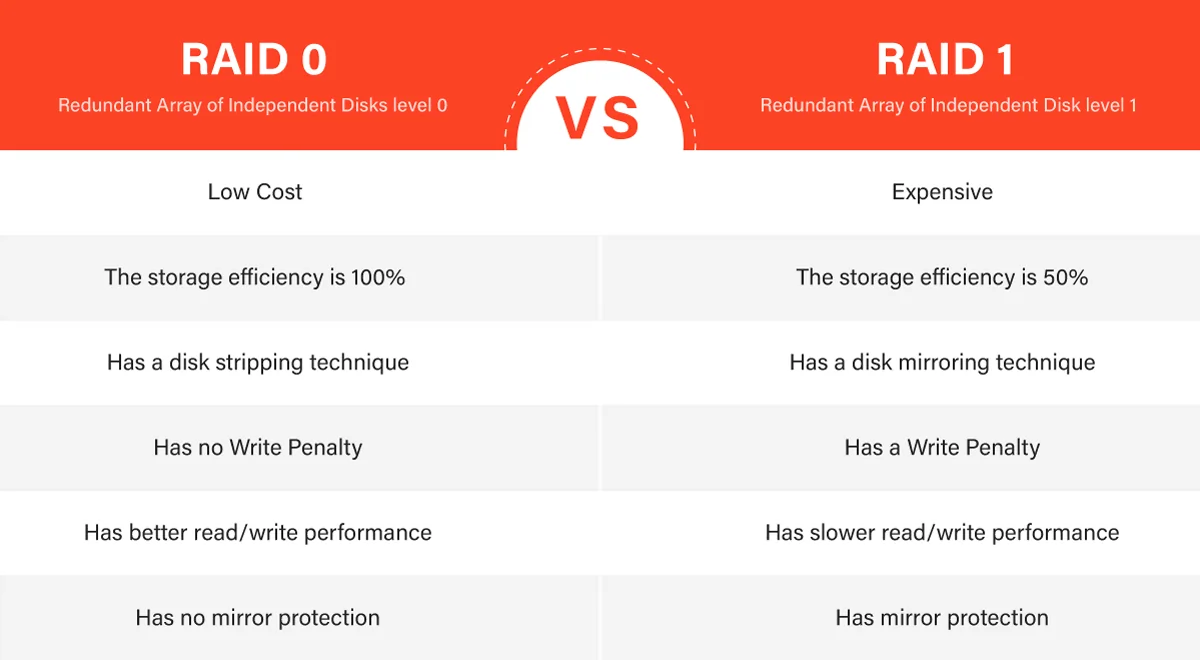
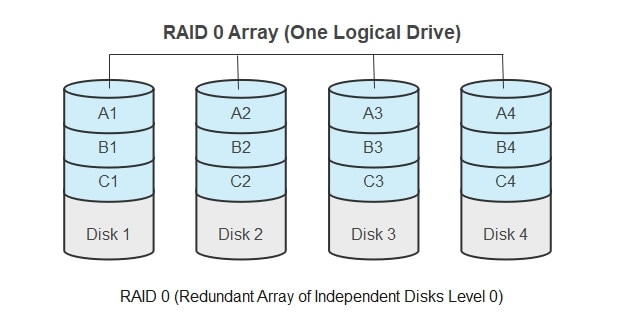
RAID 0 Vs 1 Main Difference Between The Levels RAID 0 1024x642 . RAID L G Hi U R V C C C P RAID 0 RAID 1 RAID 5 THIETBINAS COM RAID La Gi Cap Do RAID 0 RAID 1 RAID 5 . RAID 0 Vs RAID 1 Performance Redundancy And Data Safety RAID 0 Vs. 1.webp. O Que Raid 0 Striping De Disco Explicado How Does Raid 0 Work . RAID 0 1 5 6 10 50 Advanced Practical Guide Image 27


RAID L G Hi U R V C C C P RAID 0 RAID 1 RAID 5 THIETBINAS COM RAID La Gi Cap Do RAID 0 RAID 1 RAID 5 2 1200x675 . RAID L G Hi U R V C C C P RAID 0 RAID 1 RAID 5 THIETBINAS COM RAID La Gi Cap Do RAID 0 RAID 1 RAID 5 3 . RAID L G Hi U R V C C C P RAID 0 RAID 1 RAID 5 THIETBINAS COM RAID La Gi Cap Do RAID 0 RAID 1 RAID 5 5 1200x675 . What Is Raid 0 Disk Striping Explained What Is Raid 0 . RAID PDF RAID 7 320

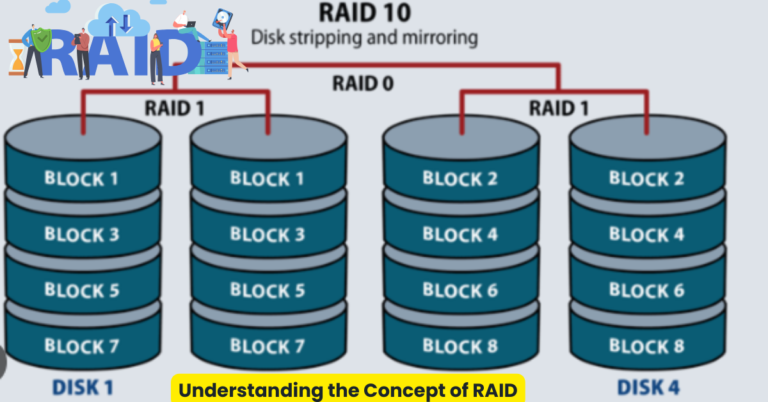
RAID 0 1 5 6 Explained Storage RAID Types Guide Raid Levels Raid 0 1 5 6. What Is Hardware RAID Storage Content 2 . Tech RAID Levels Made Simple RAID Helps Improve Media. What Is RAID 0 Striping How Does It Work Its Pros Cons Raid 0 . Does RAID Improve The Security Of Your Data Net Blog The Concept Of RAID 768x402
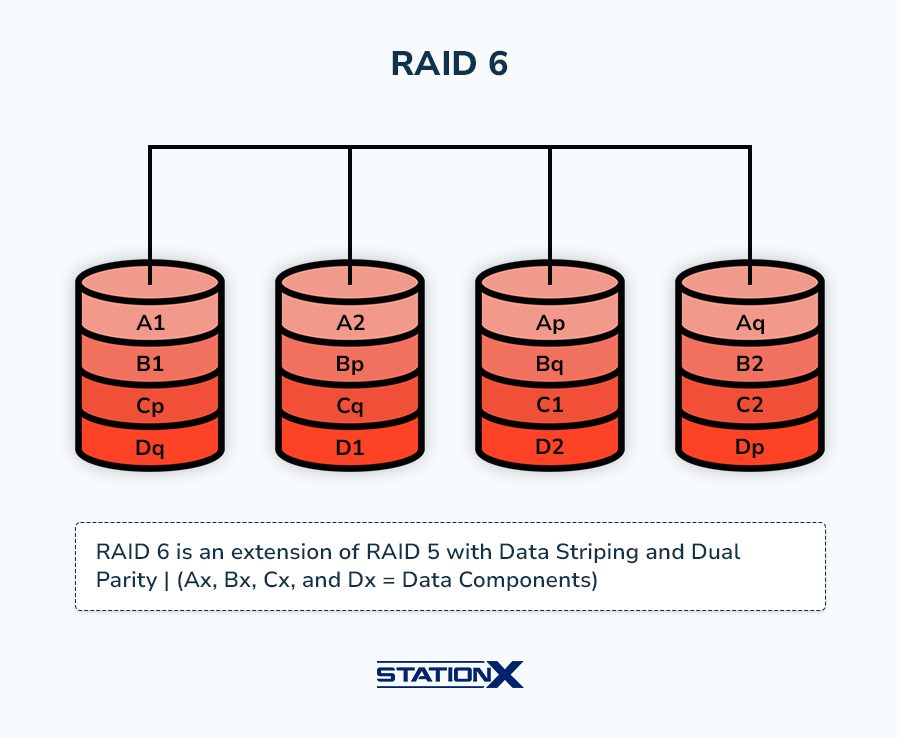


RAID 0 Vs RAID 1 Differences In Speed Performance What Is RAID 6 . Intel Vs AMD Servers Which CPU Is Best For Hosting What Is Raid . Top 10 Most Anticipated Games Of 2026 What To Watch Out For TVN GAMES IN 2026 . Xbox Game Showcase 2026 Trailers Release Dates TAFT Independent 2026 Video Game Release Dates Post Feature Image . Does RAID 0 Increase FPS Darwin S Data


RAID 10 The Ultimate Guide To And Raid 10 The Ultimate Guide To And 2 . Raid 0 Vs Raid 1 Diferencias Y Similitudes Geekflare Spain . To RAID PDF To RAID 1 2048 . RAID 6 Vs RAID 10 Best RAID Option To Use 2026 RAID 6 Vs. RAID 10