Understanding how much watts a gaming PC uses is crucial for every US gamer, especially those balancing their passion with real-world responsibilities. This comprehensive guide provides navigational and informational insights into PC power consumption, helping you optimize performance, manage electricity costs, and make smart upgrade decisions. From deciphering component wattage to selecting the right Power Supply Unit PSU, we cover everything you need to know. Learn about average power draw, factors influencing usage, and practical tips to minimize your environmental footprint without sacrificing gaming quality. Stay ahead with trending advice on energy-efficient setups and ensure your gaming rig is future-proof and budget-friendly. This resource is designed to empower you with the knowledge to maintain a high-performance, cost-effective gaming experience.
What is the typical wattage range for a gaming PC?
A typical gaming PC under active load can draw anywhere from 300 to 800 watts, with high-end systems featuring top-tier GPUs and CPUs consuming the most power. Idle usage is significantly lower, often under 100 watts.
Which specific components are the biggest power consumers in a gaming PC?
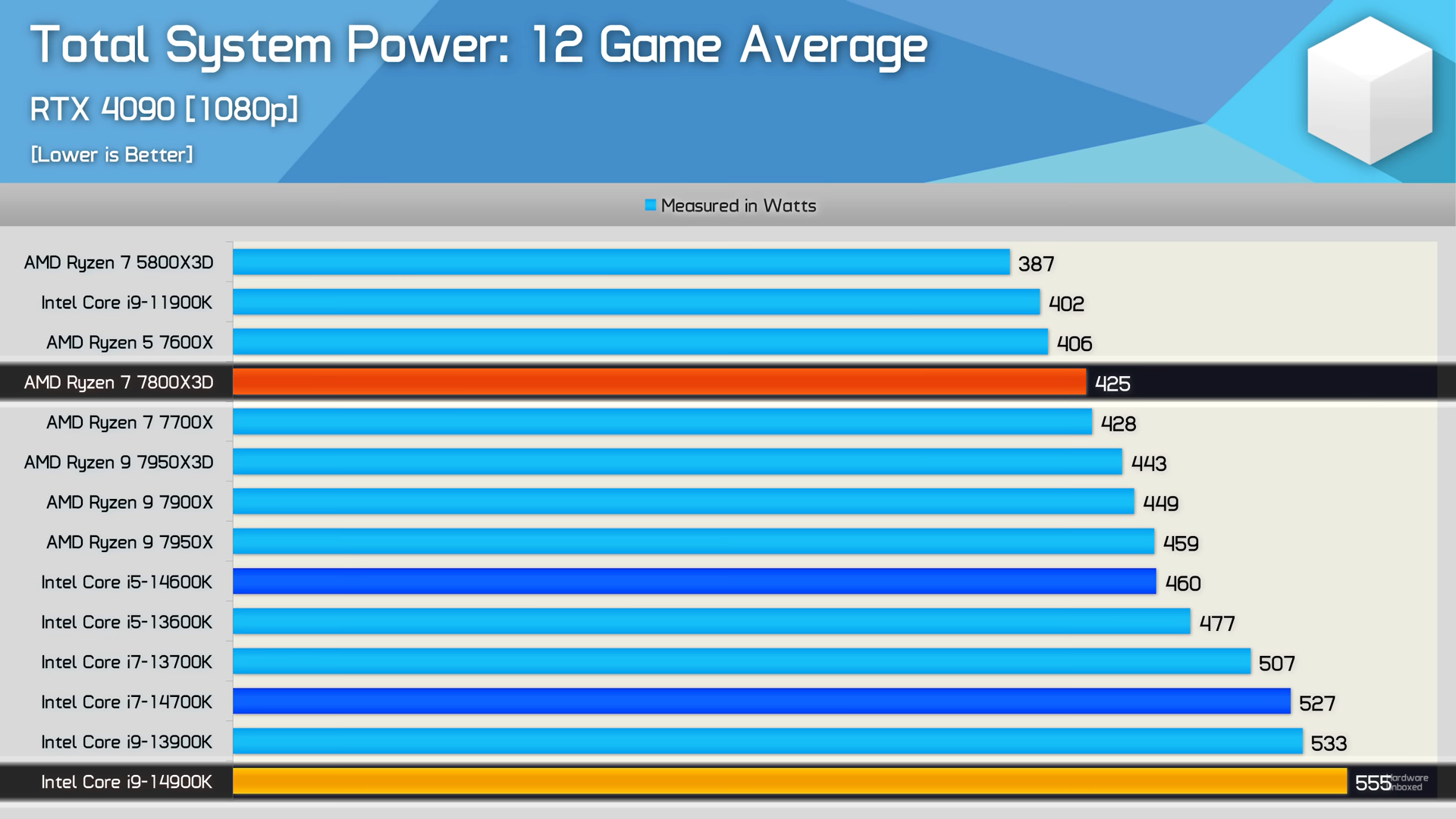
The Graphics Processing Unit GPU, or graphics card, is overwhelmingly the biggest power consumer, often drawing 200-400 watts or more. The Central Processing Unit CPU is the second largest, requiring 65-250 watts depending on the model and load.
How does the wattage of a gaming PC impact electricity bills?
The wattage directly impacts your electricity bill. A PC drawing 500 watts for 4 hours a day at an average US electricity rate of $0.15/kWh would cost roughly $9 per month. Higher wattage and longer usage times increase this cost proportionally.
Is it better to get a higher wattage PSU than my PC actually needs?
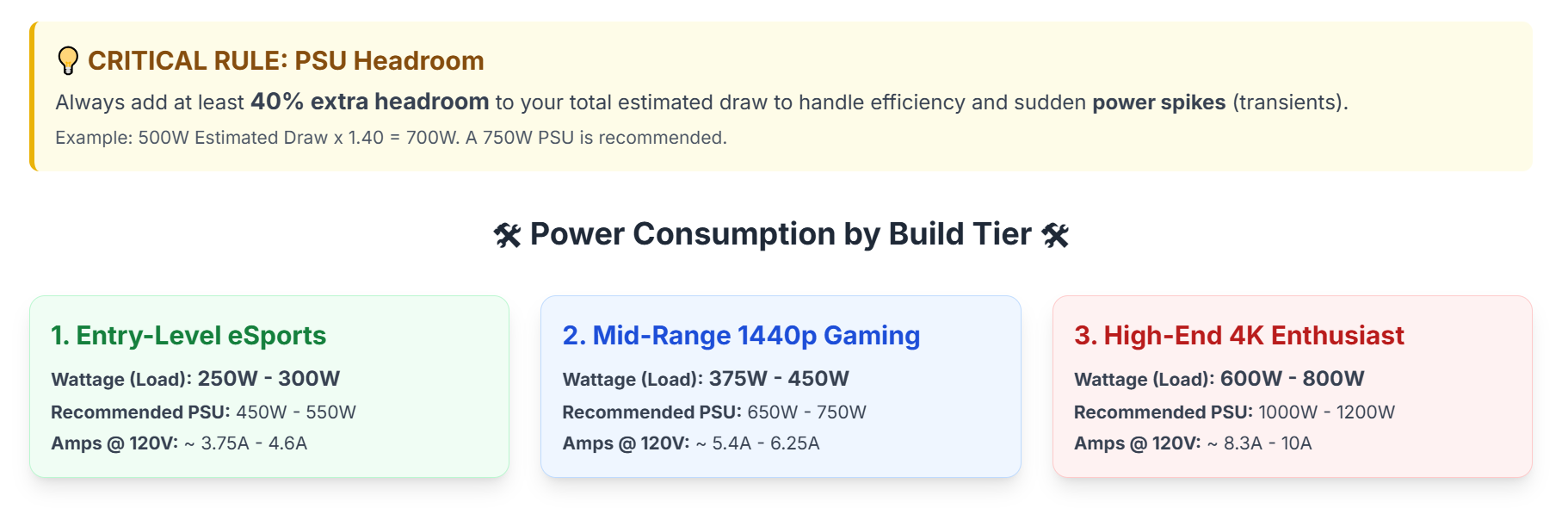
Yes, it's generally better to select a Power Supply Unit PSU with a wattage 15-20% higher than your estimated peak system requirement. This provides crucial headroom for power spikes, ensures stable operation, and allows for future component upgrades without immediate PSU replacement.
Can a weak power supply damage my gaming PC components?
An underpowered or weak power supply can indeed damage your gaming PC components. It can lead to system instability, random reboots, crashes, and potentially premature component failure due to insufficient or inconsistent power delivery, especially during demanding tasks.
What are the best practices for optimizing gaming PC power consumption?
Best practices for optimizing power consumption include adjusting in-game graphics settings, utilizing Windows power plans, considering GPU undervolting, enabling PSU eco-modes, and opting for energy-efficient components when upgrading. These steps can reduce wattage without significantly impacting performance.
How does the 80 Plus certification relate to a PSU's efficiency and power use?
The 80 Plus certification indicates a PSU's efficiency, meaning how much AC power from the wall is converted into usable DC power for your PC. Higher certifications (Bronze, Silver, Gold, Platinum, Titanium) mean better efficiency (e.g., 80% to 94% efficient), leading to less wasted heat and slightly lower electricity consumption over time, especially under typical loads.
Hey fellow gamers! Ever found yourself deep in a raid or a competitive match, the fan whirring, and then a nagging thought creeps in: "How much watts does this gaming PC actually use?" If so, you're not alone. Many of us, especially those balancing gaming with jobs, families, and life's endless quests, worry about electricity bills or ensuring our rig runs optimally without blowing a fuse (literally!). We love the escape, the challenge, the social connection gaming offers—87% of US gamers play regularly, often for 10+ hours a week. But that passion comes with practical considerations. We want to maximize our fun, build our skills, connect with friends, and optimize performance, all while getting value for our money and staying current without succumbing to marketing hype. Understanding your PC's power draw is a foundational step in achieving that balance. This guide will cut through the noise, offering practical, no-nonsense advice to help you understand your gaming PC's wattage, manage costs, and make smart upgrade choices. Let's dive in!
What Components Consume the Most Power in a Gaming PC?
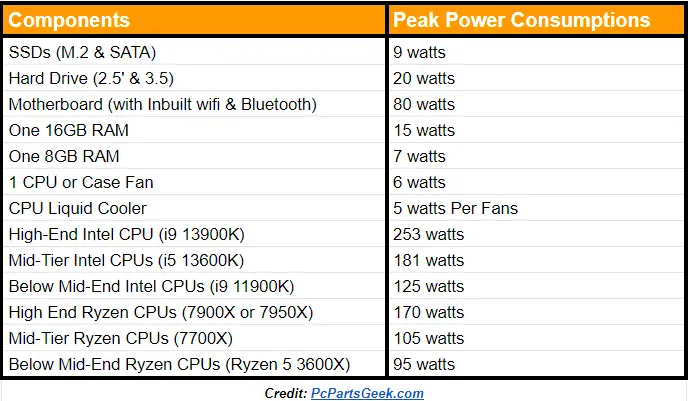
When we talk about "how much watts does a gaming PC use", the lion's share of that power goes to a few key components. Think of your PC's components like a team of adventurers, each needing a certain amount of energy to perform their role. The Graphics Processing Unit GPU, often called the graphics card, is almost always the biggest power hog. It's responsible for rendering all those beautiful, immersive worlds and high frame rates. High-end GPUs from NVIDIA and AMD can easily draw 200-400 watts on their own under heavy gaming loads. The Central Processing Unit CPU comes in a close second. While CPUs are becoming more power-efficient, a powerful gaming CPU still requires significant wattage, especially when boosting clock speeds or handling complex game physics. Expect CPUs to consume anywhere from 65 to 250 watts. After these two titans, other components like RAM, SSDs/HDDs, motherboard, and cooling fans consume comparatively little power. However, their collective draw still adds up, typically accounting for another 50-100 watts depending on your setup.
What's the Average Wattage of a Gaming PC Under Load?
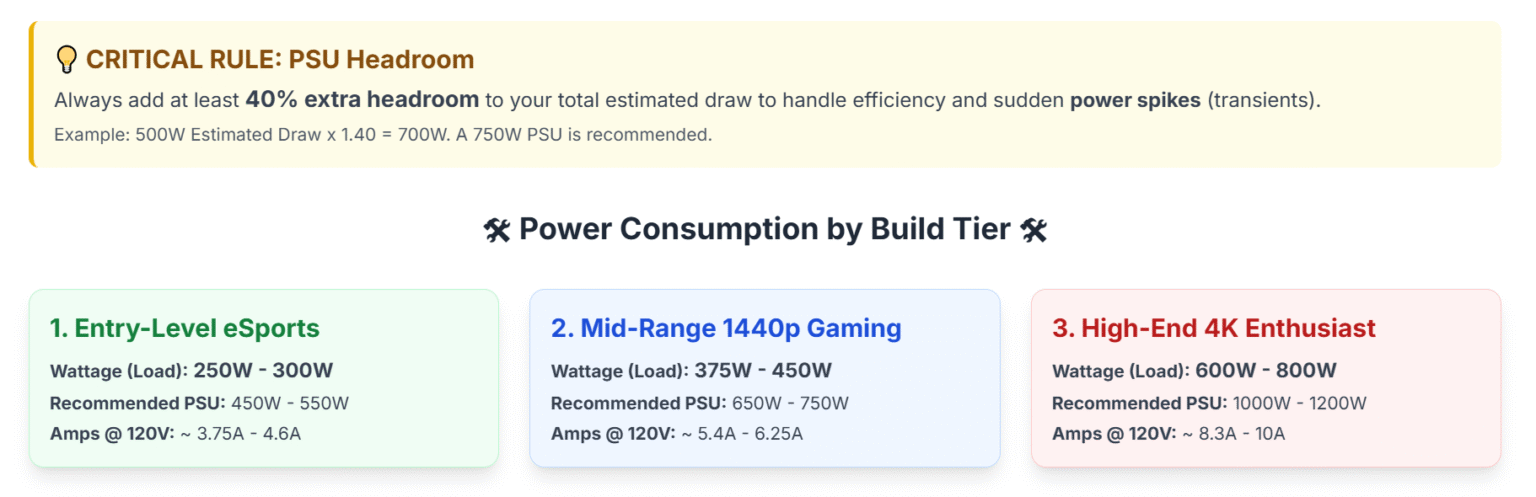
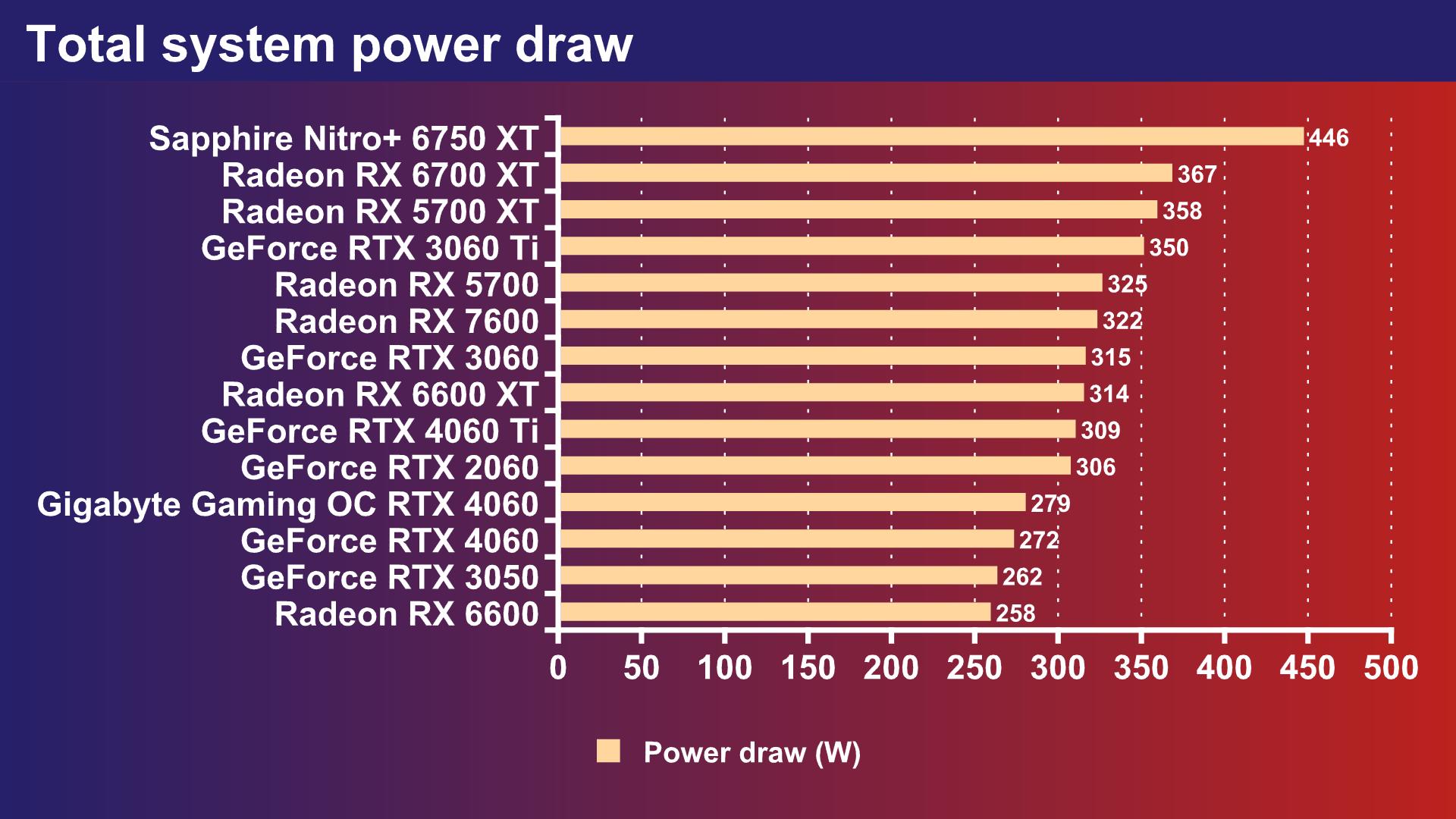
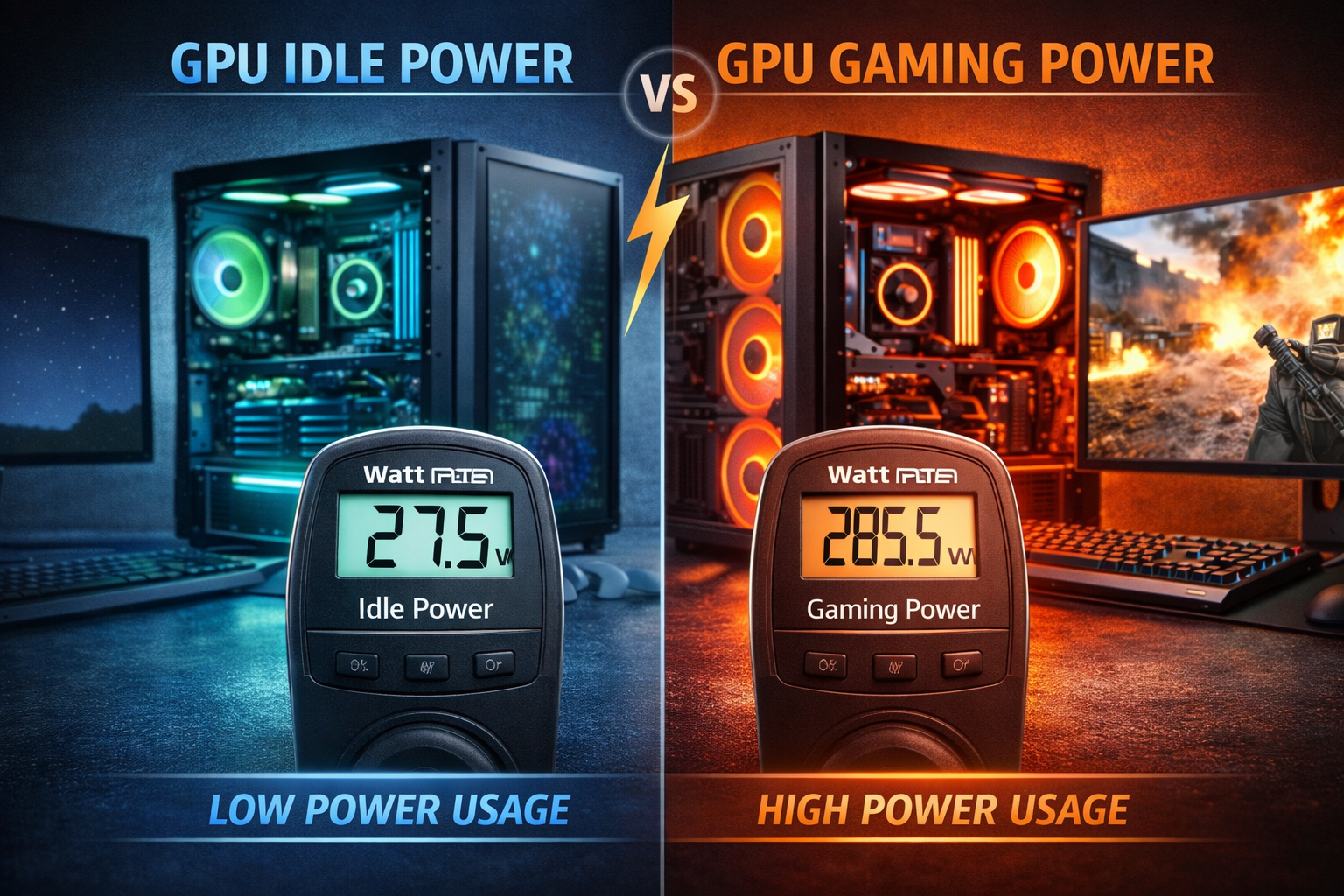
The average wattage a gaming PC uses can vary widely, but generally, a modern gaming PC, when running a demanding game, will pull between 300 to 800 watts from the wall. This figure doesn't include the monitor, which is a separate power draw. For a mid-range system with a Ryzen 5 or Intel i5 CPU and an RTX 3060 or RX 6700 XT GPU, you're probably looking at 350-500 watts. A high-end system featuring an Intel i9 or Ryzen 9 and an RTX 4080/4090 or RX 7900 XTX could easily hit 600-800 watts. These numbers represent the peak power draw during intense gaming sessions. When idle or performing light tasks like browsing, your PC's power consumption drops significantly, often to below 100 watts. Understanding this range helps you gauge potential electricity costs and select an appropriate Power Supply Unit PSU.
How Do I Calculate My Gaming PC's Total Wattage?
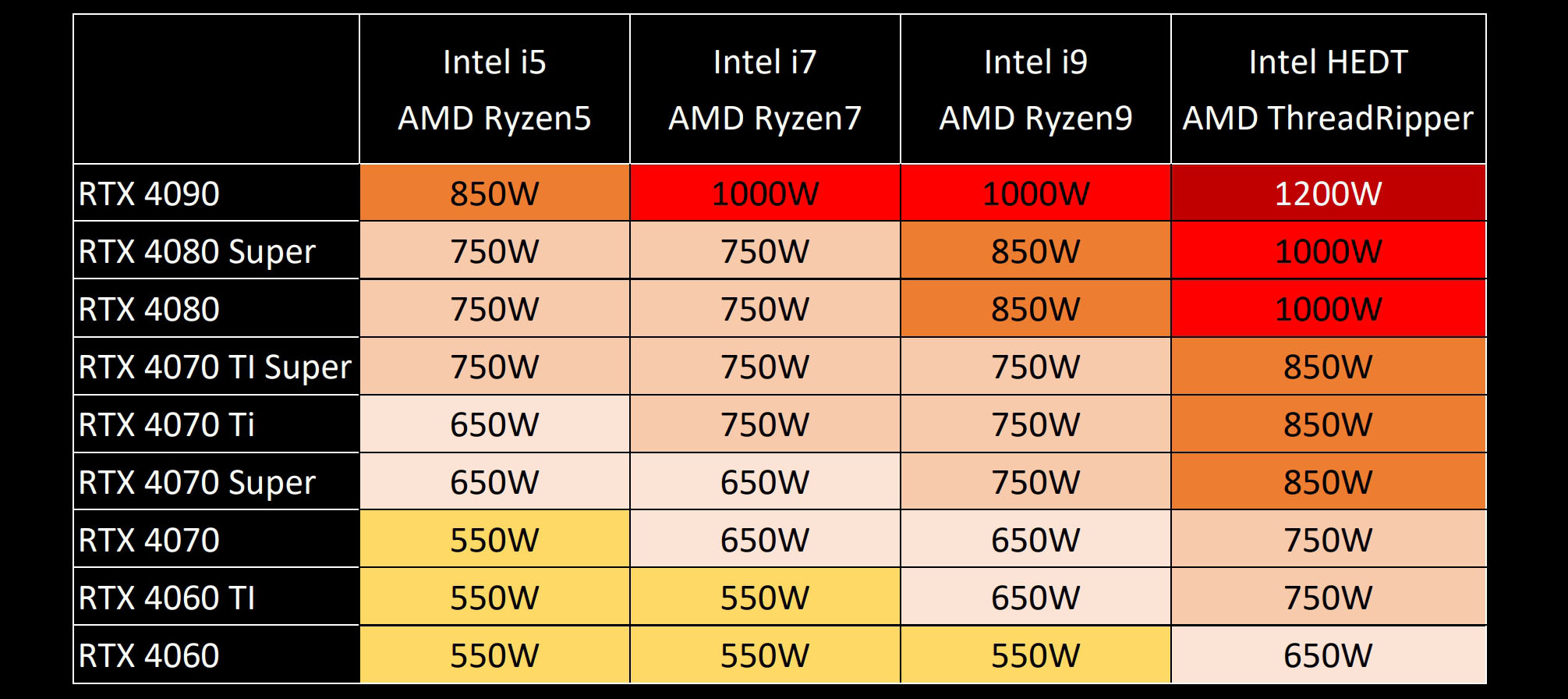
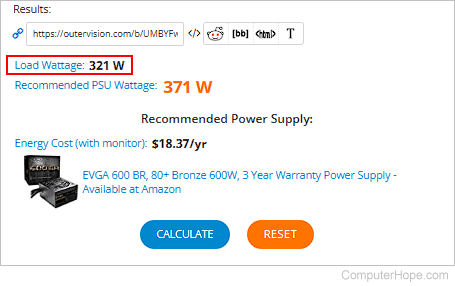
Calculating your gaming PC's total wattage is crucial for selecting the right PSU and managing energy costs. While exact measurement requires a kill-a-watt meter, you can estimate your system's needs with reasonable accuracy. Start by identifying the TDP Thermal Design Power or typical power draw for your CPU and GPU. These figures are usually available on the manufacturer's website or in hardware reviews. For example, a CPU might list a 125W TDP, and a GPU might have a 320W power draw. Then, add a generous estimate for other components. A good rule of thumb is to add 50-100 watts for the motherboard, RAM, SSDs, HDDs, and fans. So, CPU + GPU + Other Components = Estimated Total Wattage. Websites like PCPartPicker.com offer excellent built-in wattage calculators that factor in specific component models and provide a much more precise estimate. Always aim for a PSU with at least 15-20% more wattage than your calculated total to provide headroom for power spikes, future upgrades, and optimal efficiency.
Why Is Choosing the Right PSU Wattage Important for Gamers?
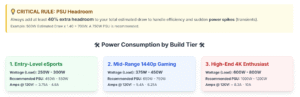
Choosing the correct Power Supply Unit PSU wattage is one of the most critical decisions for a gaming PC, affecting everything from stability to future-proofing. An underpowered PSU can lead to system instability, random reboots, crashes during intense gaming, and even hardware damage over time as components don't receive enough consistent power. On the flip side, an excessively oversized PSU might not operate at its peak efficiency, potentially wasting a small amount of electricity, though modern PSUs are quite efficient across a broad load range. The sweet spot is a PSU that can comfortably handle your PC's maximum power draw while leaving some headroom for future upgrades. As a rule of thumb, if your estimated total wattage is 500W, a 650W or 750W PSU would be an excellent choice, providing a safety net and allowing for component upgrades down the line without needing to replace the PSU immediately. Remember, the PSU is the heart of your PC, delivering vital power to every component; don't skimp on it!
Does Overclocking My CPU or GPU Significantly Increase Power Consumption?
Yes, overclocking your CPU or GPU will definitely increase its power consumption. Overclocking involves pushing your components beyond their factory-set clock speeds, which requires more voltage to maintain stability. More voltage and higher clock speeds directly translate to higher wattage draw and increased heat output. For example, a GPU that draws 250 watts at stock speeds might easily jump to 300-350 watts or more when heavily overclocked. Similarly, an overclocked CPU can see its power draw rise by 20-50 watts or even more depending on the chip and clock speed. While overclocking can provide a noticeable performance boost, especially for gamers looking to squeeze every frame out of their system, it comes at the cost of increased power usage and potentially higher temperatures. Always ensure your PSU has ample headroom and your cooling solution is robust enough to handle the extra heat when considering overclocking.
How Can I Reduce My Gaming PC's Power Consumption Without Sacrificing Performance?
Balancing power efficiency with gaming performance is a sweet spot many gamers aim for. While you don't want to cripple your frames, there are smart ways to reduce "how much watts does a gaming PC use."
- Adjust In-Game Settings: Lowering settings like V-Sync, anti-aliasing, or shadow quality can reduce GPU load and thus power draw without a huge visual impact.
- Monitor Refresh Rate: If your monitor supports a high refresh rate but you're not always gaming, setting it lower (e.g., 60Hz instead of 144Hz) for desktop use can save power.
- Power Plans: Utilize Windows power plans. Set to 'Balanced' for general use and switch to 'High Performance' only when gaming.
- GPU Undervolting: This advanced technique involves reducing your GPU's voltage while maintaining its clock speed. It can significantly lower power consumption and heat with minimal performance loss, but requires careful tuning.
- Eco-Mode PSUs: Many modern PSUs have an 'Eco Mode' fan setting, which only spins the fan when needed, saving a tiny bit of power and reducing noise.
- Component Selection: When upgrading, consider power efficiency. Newer generations of CPUs and GPUs often offer better performance per watt.
These tips help gamers find that perfect equilibrium, getting the most out of their system while being mindful of energy use. It's about smart choices, not sacrifices.
Does Leaving My Gaming PC On All the Time Waste a Lot of Electricity?
Leaving your gaming PC on 24/7 definitely uses more electricity than turning it off, but the actual "waste" depends on your habits and electricity rates. When idle, a modern gaming PC might consume 50-100 watts. Over 24 hours, that's 1.2-2.4 kWh per day. Multiply that by your local electricity cost (e.g., $0.15/kWh), and you're looking at an extra $0.18-$0.36 per day, or roughly $5-$10 per month just for idle power. While this might seem minimal for some, it adds up over a year. Many gamers, averaging 10+ hours a week, might find it more practical to put their PC to sleep or hibernate when not in use. Sleep mode uses minimal power (around 1-5 watts) and allows for a quick resume. Hibernate saves your session to disk and powers off, consuming almost zero power, though startup is slower than sleep. For long periods of inactivity, a full shutdown is the most energy-efficient option. US gamers are becoming more conscious of environmental impact and cost, so small habits like this can make a difference.
How Often Should I Re-evaluate My PSU Needs for Upgrades?
Re-evaluating your Power Supply Unit PSU needs is a critical step whenever you're planning a major hardware upgrade, especially for your GPU or CPU. These are the components that dramatically impact "how much watts does a gaming PC use." A good rule of thumb is to check your PSU's capacity whenever you're considering buying a new graphics card or processor. If your current PSU is already running close to its maximum recommended load, or if the new component's power requirements significantly exceed the headroom you initially built into your system, it's definitely time for an upgrade. For example, if you're upgrading from an RTX 3060 to an RTX 4080, which can double your GPU's power draw, your old 650W PSU might no longer be sufficient. Using an online PSU calculator with your planned new components is the easiest way to determine if your existing PSU will cut it. Aim to have at least a 15-20% buffer above your estimated peak system wattage to ensure stability and future-proof your rig for the next generation of games.
Conclusion
Understanding "how much watts does a gaming PC use" isn't just for tech enthusiasts; it's vital for every gamer who wants to optimize their setup, manage costs, and ensure a stable, high-performance experience. We've explored the power hungry components, learned how to estimate wattage, and discussed strategies for efficiency without sacrificing those precious frames. From choosing the right PSU to adjusting in-game settings, small changes can lead to big benefits for your wallet and your rig's longevity. Remember, staying informed about your hardware helps you game smarter, not harder. What's your biggest gaming challenge when it comes to performance or power? Comment below!
Frequently Asked Questions About Gaming PC Power
How much electricity does a gaming PC use per hour?
A gaming PC uses between 300 to 800 watts per hour when actively gaming. This translates to 0.3 to 0.8 kilowatt-hours kWh. The exact amount depends on your specific components and game demands.
Is 750W PSU enough for gaming PC?
For most modern gaming PCs, a 750W Power Supply Unit PSU is ample. It can comfortably power many high-end CPUs and GPUs, providing good headroom for stability and moderate future upgrades.
Does a gaming PC use more power than a console?
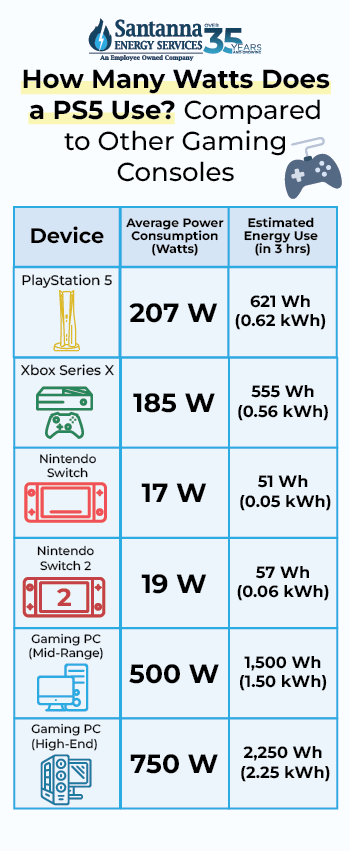
Generally, a high-end gaming PC under full load will use more power than a modern gaming console like a PS5 or Xbox Series X. Consoles are optimized for specific hardware configurations, often drawing around 150-300 watts.
Can I use a normal power strip for my gaming PC?
Yes, you can use a normal power strip for your gaming PC, but it is highly recommended to use a surge protector power strip. This protects your valuable components from power spikes and fluctuations, which can cause damage.
How do I check my current PC power consumption?
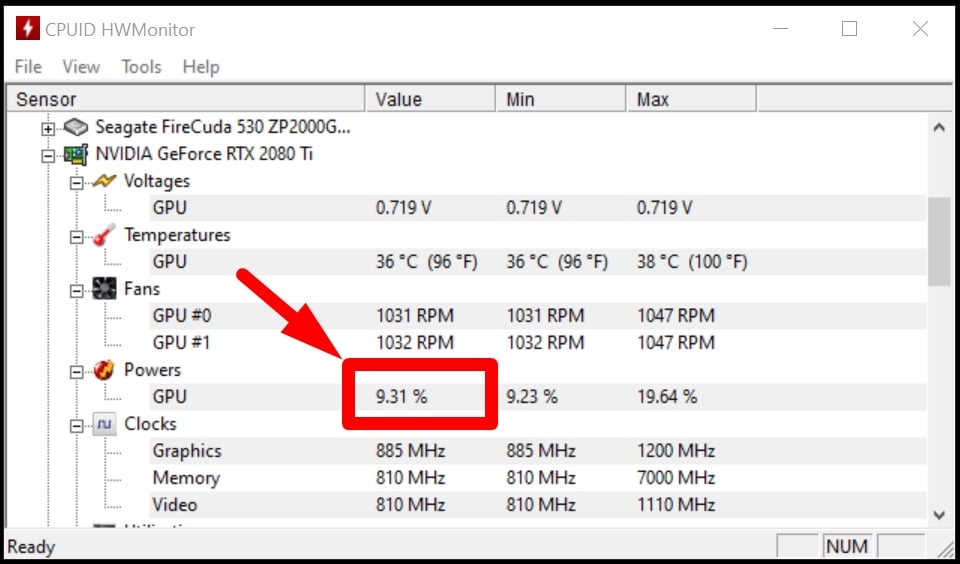
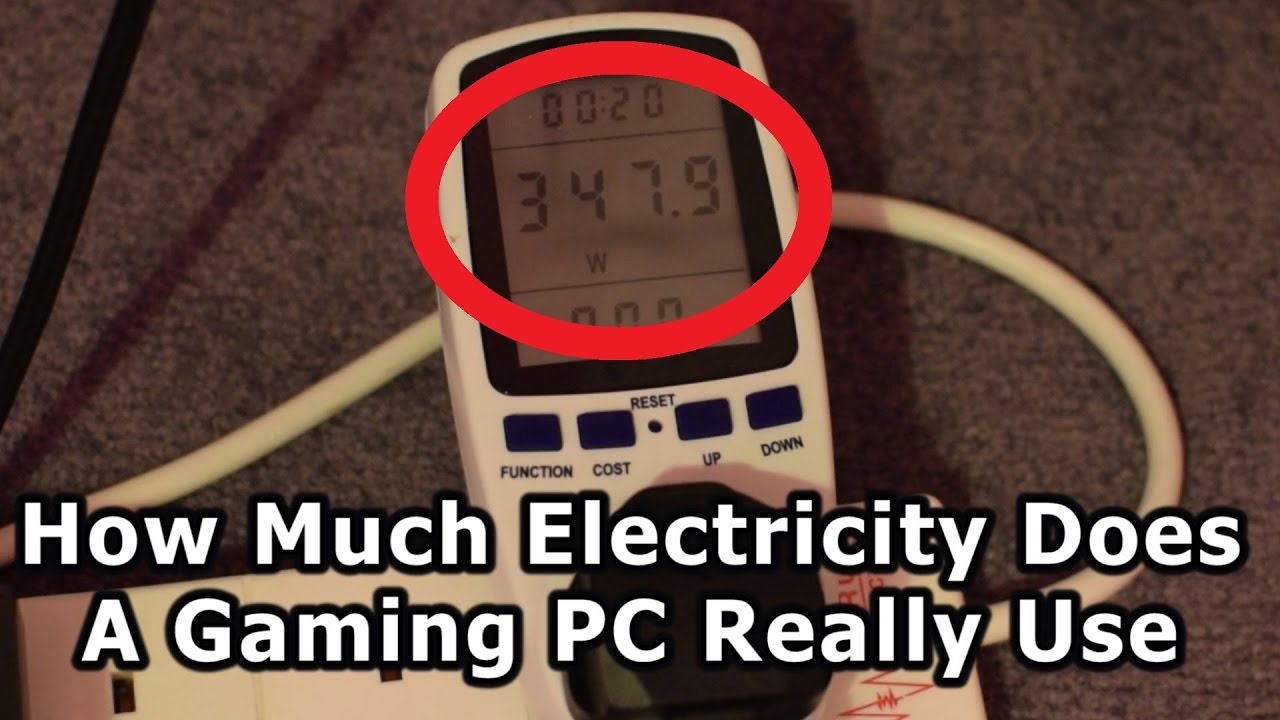
To check your current PC power consumption accurately, you can use a "kill-a-watt" meter plugged between your PC and the wall outlet. Software tools can estimate component usage but aren't as precise for total system draw.
Is 500 watts enough for a gaming PC?
A 500-watt Power Supply Unit PSU can be sufficient for entry-level or mid-range gaming PCs with less demanding GPUs and CPUs. However, it offers limited headroom for future high-performance upgrades.
Understanding gaming PC wattage is vital for performance and budget.Modern gaming PCs typically draw 300 to 800 watts under load.Key components like GPU and CPU are the biggest power consumers.An appropriately sized Power Supply Unit PSU is essential for stability.Optimizing settings and hardware can reduce power consumption.Calculating your PC's wattage helps manage electricity costs and plan upgrades.
35

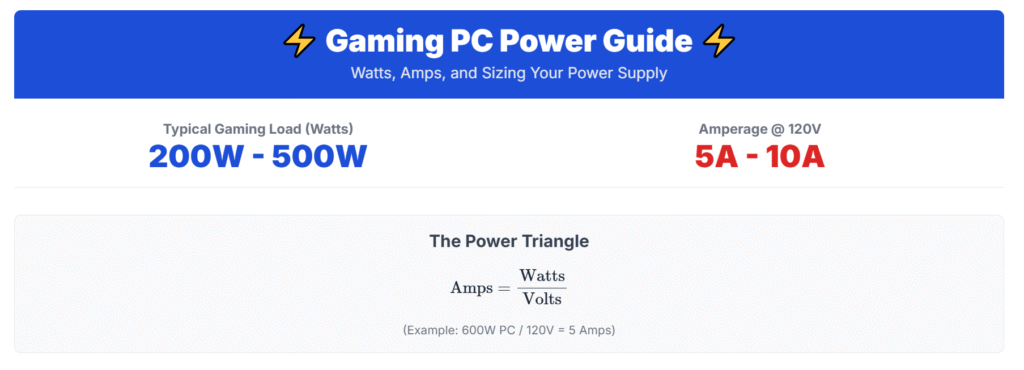

Ultimate Guide To Energy Efficient Gaming How Much Electricity Does A PC Use . Does My Pc Use A Lot Of Electricity At Milla Hawthorn Blog How Much Energy Does A Gaming PC Use . How Many Amps Watts Does A Gaming PC Use How Much Electricity Does A Image 1024x370 . How Many Watts Is A Gaming PC Really Using How Much Power Does A Gaming PC Use . How Much Watts Does A Gaming Pc Use Explora Madeira How Much Energy Does Gaming Computers Use

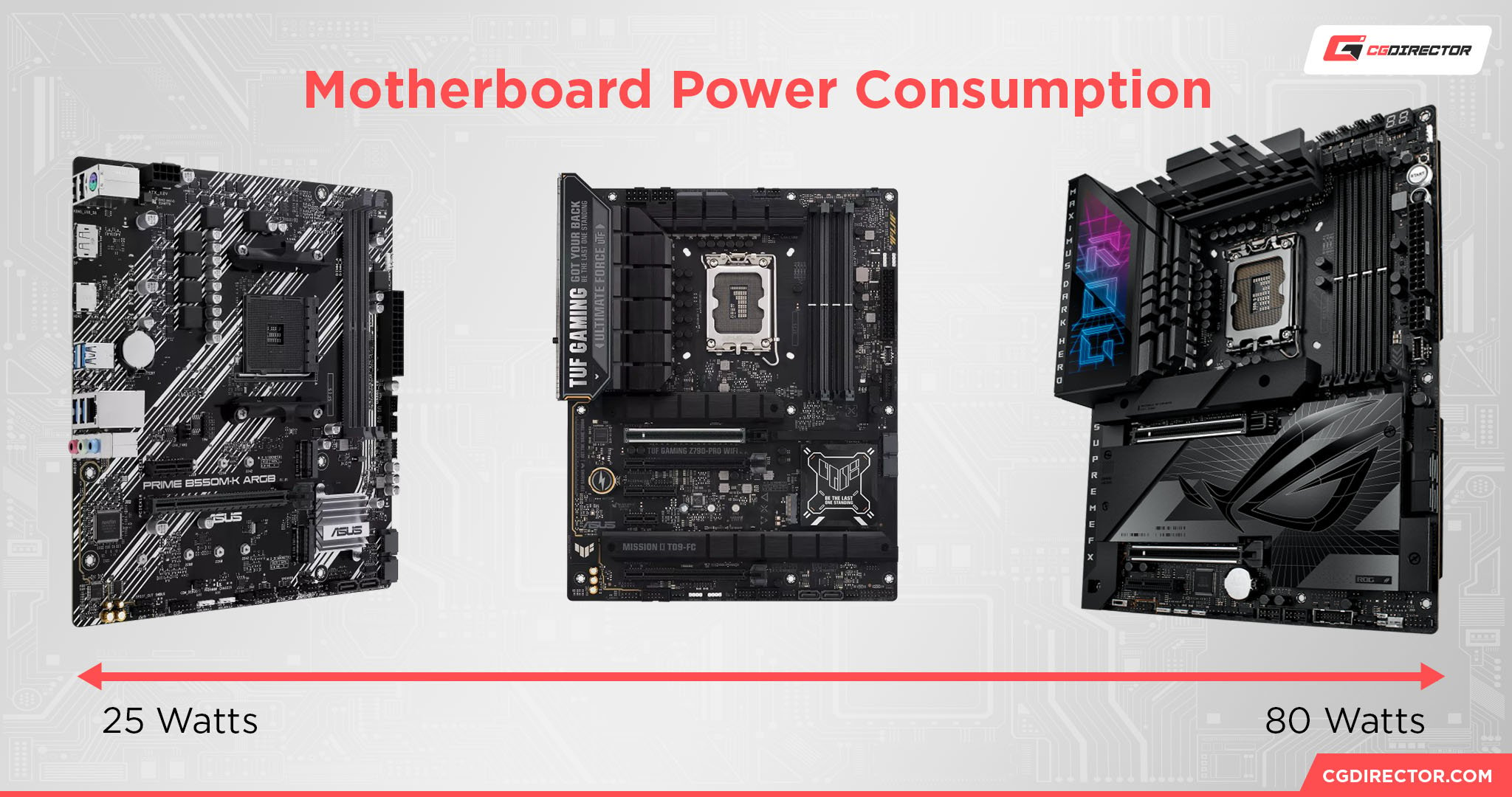

How Many Watts Does A Gaming PC Use Complete Guide How Many Watts Does A Gaming PC Use . How Many Watts Is A Gaming PC Really Using How Many Amps Does A Gaming PC Use . How Many Watts Does A PC S Motherboard Use Motherboard Power Consumption . Power Supply And GPU 2 Things To Check PCPartsGeek All Components Required Psu Watts . The Rise Of Power Are CPUs And GPUs Becoming Too Energy Hungry TechSpot Power


How Much Watts Does A Gaming Pc Use Explora Madeira Gaming Pc Power Consumption . The Big Surprise In Home Energy Consumption Gaming PCs Gamer Computer Use 580 264 . How Many Watts Is A Gaming PC Really Using How Many Watts Does A Gaming PC Use . How Many Watts Is A Gaming PC Really Using Current Power Draw Of GPU In HWMonitor . How Many Amps Watts Does A Gaming PC Use How Much Electricity Does A Image 1

Computer Advice Good Deal Now Idiot S Guide To Buying A New PC . How Many Watts Does A Laptop Use Gaming Vs Basic Laptops 2026 High Refresh Rate Gaming Laptops . How Many Amps Watts Does A Gaming PC Use How Much Electricity Does A Image 1 1536x497 . How Many Amps Watts Does A Gaming PC Use How Much Electricity Does A Image 1 1024x332 . How Much Power Does A Gaming PC Consume


Subwoofer Power Draw At Mamie Shields Blog Nvidia GeForce RTX 4060 Review Power Draw . How Many Amps Watts Does A Gaming PC Use How Much Electricity Does A Ella Don 0oqMvhc1ntw Unsplash 1024x683 . How Many Watts Is A Gaming PC Really Using Power Consumption Comparison Analysis . How Many Watts Does A PS5 Use Gaming Energy Explained How Many Watts Does A PS5 Use.webp. Review NVIDIA GeForce RTX 5090 Founders Edition Reference Powr1.webp


How Much Power Does A Gaming PC Use Electricity Cost Of A Gaming PC 1024x485 . How Many Amps Watts Does A Gaming PC Use How Much Electricity Does A Image 1 300x97 . How Many Watts Does A GPU Use Complete Power Consumption Guide Gpu Power Usage During Gaming Vs Idle . How Much Electricity Does A Gaming PC Use Archute How Much Electricity Does A Gaming PC Use . How To Check Power Draw On Pc
How Much Power Does A PC Use Power Draw Explained How Much Power Does A PC Use Power Draw Explained Twitter . Android Game HKEPC Hardware No 1 PC Core I9 14900K 12 Game Average Power Consumption . How Much Does A Gaming Computer Cost In Electricity Detroit Chinatown . How To Check A PC S Power Consumption Outervision Total System Draw . How Much Power Does A Gaming Pc Use BPC Technology Dalle LS353